$computername=$env:computername
$localAdminPassword='PASSWORD'

function demoteDc($computername=$env:computername,$localAdminPassword){
    $erroractionpreference=stop
    $encryptedPass=convertto-securestring $localAdminPassword -asplaintext -force
    Import-Module ActiveDirectory
    $thisComputer=$env:computername
    $fsmoRoles=Get-ADDomainController -Filter *|Select-Object Name, Domain, Forest, OperationMasterRoles|Where-Object {$_.OperationMasterRoles}|select Name,OperationMasterRoles
    $pdcServer=($fsmoRoles|?{'PDCEmulator' -in $_.OperationMasterRoles}).Name
    $dns1=[system.net.dns]::GetHostByName($pdcServer).AddressList.IpaddressToString|select -first 1
    try{
        if($pdcServer -eq $thisComputer){
            write-warning "Are you sure that you want to demote this Primary Domain Controller $pdcServer?"
            pause
            Uninstall-ADDSDomainController -Force -LocalAdministratorPassword $encryptedPass -norebootoncompletion:$false -ForceRemoval -DemoteOperationMasterRole
            # write-host "Run this command to remove Last DC:`r`n"
            # pause
            # Uninstall-ADDSDomainController -Force -LocalAdministratorPassword $encryptedPass -norebootoncompletion:$false -ForceRemoval -DemoteOperationMasterRole -LastDomainControllerInDomain -IgnoreLastDnsServerForZone
        }else{
            Uninstall-ADDSDomainController -Force -LocalAdministratorPassword $encryptedPass -norebootoncompletion:$false
        }
        Uninstall-WindowsFeature AD-Domain-Services
        $defaultInterface=get-wmiobject win32_networkadapterconfiguration -filter "ipenabled='true'"|?{$_.DefaultIpGateway -ne $null}
        Set-DnsClientServerAddress -InterfaceIndex $defaultInterface.Index -ServerAddresses @($dns1,'8.8.8.8')
        Register-DnsClient
        restart-computer -force
    }catch{
        write-warning $_
    }
}

demoteDc $computername $localAdminPassword
Windows 2016 or Higher
Import-Module ActiveDirectory
Uninstall-ADDSDomainController -Force -LocalAdministratorPassword (convertto-securestring "Password1!" -asplaintext -force) -norebootoncompletion:$false #Optional for PDC: -ForceRemoval -DemoteOperationMasterRole #Last DC: -LastDomainControllerInDomain -IgnoreLastDnsServerForZone
Uninstall-WindowsFeature AD-Domain-Services
Windows 2008 R2 and Older
# Remove DHCP Server Service
$oldDHCPServername=$ENV:computername
$oldDHCPServerIP=(gwmi Win32_NetworkAdapterConfiguration | ? { $_.IPAddress -ne $null }).ipaddress[0]
netsh dhcp delete server $oldDHCPServername $oldDHCPServerIP
# Remove DC from the Global Catalog Role
repadmin.exe /options $oldDHCPServername –IS_GC
# Check FSMO to ensure that it does not hold any operation master roles
PS C:\Windows\system32> netdom query fsmo
Schema master               DC01.INTRA.NET
Domain naming master        DC01.INTRA.NET
PDC                         DC01.INTRA.NET
RID pool manager            DC01.INTRA.NET
Infrastructure master       DC01.INTRA.NET
The command completed successfully.
# Remove AD Role for Windows 2008 (suppress warnings about fsmo)
dcpromo /unattend /uninstallbinaries /AdministratorPassword:Password1! /DemoteFSMO:Yes /RebootOnCompletion:Yes

# use this if the demoting DC could not contact other DCs on the network - hence, it will join a WORKGROUP thereafter
dcpromo /forceremoval /uninstallbinaries /demotefsmo:yes /administratorpassword:Password1! /RebootOnCompletion:Yes
Follow the dcpromo wizard…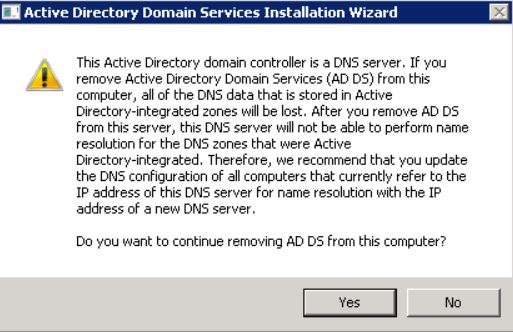
# Remove DNS
ServerManagerCmd.exe -remove dns -restart
# Cleanup metadata
ADUC > Domain Controllers > right-click the orphanated DC > Delete > put a check mark next to "Delete this Domain Controller anyway..." > Delete > Confirm 'Yes'

# Cleanup orphanated DC from AD Sites and Services
Active Directory Sites and Services > Default-First-Site-Name > Servers > Right-click bad record > Properties > Uncheck the box next to "Protect object from accidental deletion" > OK > Right-click bad record again > Delete > OK

# Cleanup orphanated DC metadata using ntdsutil
ntdsutil
metadata cleanup
select operation target
list domains
select domain 0	<assuming default domain>
list sites
select site 0 <assuming default site>
list servers in site
select server <number>
quit
remove selected server
quit
Cleanup DNS
Import-Module DnsServer

# Set Variables
$pdc = (Get-ADDomainController -Discover -Service PrimaryDC).HostName
$zones=(Get-DNSServerZone).ZoneName
$orphanatedDC="AD007.INTRA.NET."	#notice the dot at the end. It's important

# Remove orphanated record from all zones
$zones | % { Remove-DnsServerResourceRecord -ZoneName $_ -RRType "Ns" –Name "@" -RecordData $orphanatedDC -computerName $pdc -Force}

# View 1 Zone
Get-DnsServerResourceRecord -ZoneName _msdcs.INTRA.NET -RRType "Ns" -computerName $pdc -Node

# Remove orphanated DC from 1 zone
Remove-DnsServerResourceRecord -ZoneName 1.10.in-addr.arpa -RRType "Ns" –Name "@" -RecordData $orphanatedDC -computerName $pdc
Categories: