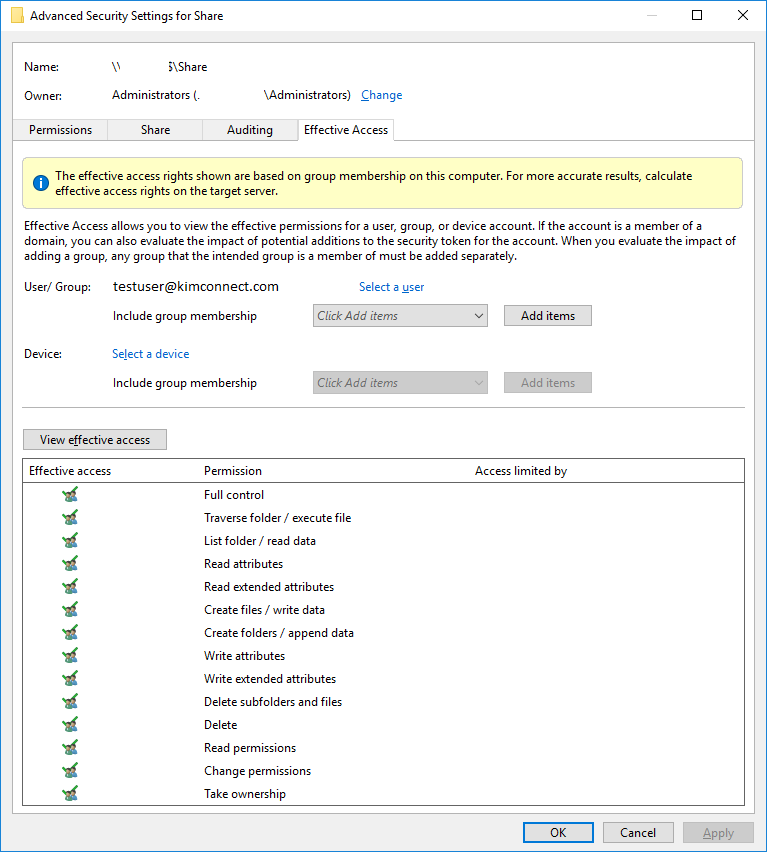
Right-click on the Folder > Properties > Security tab > Advanced > Effective Access tab > click on Select a user > input username > OK > View effective access
PowerShell Method:
$item='c:\temp'
get-acl $item|select -expand Access

# Sample output

FileSystemRights : FullControl
AccessControlType : Allow
IdentityReference : Everyone
IsInherited : False
InheritanceFlags : ContainerInherit, ObjectInherit
PropagationFlags : None

FileSystemRights : FullControl
AccessControlType : Allow
IdentityReference : NT AUTHORITY\SYSTEM
IsInherited : False
InheritanceFlags : ContainerInherit, ObjectInherit
PropagationFlags : None

FileSystemRights : FullControl
AccessControlType : Allow
IdentityReference : BUILTIN\Administrators
IsInherited : False
InheritanceFlags : ContainerInherit, ObjectInherit
PropagationFlags : None

FileSystemRights : ReadData, ExecuteFile, Synchronize
AccessControlType : Allow
IdentityReference : TestWindows\kimconnect
IsInherited : False
InheritanceFlags : ContainerInherit, ObjectInherit
PropagationFlags : None

FileSystemRights : FullControl
AccessControlType : Allow
IdentityReference : TestWindows\backupadmin
IsInherited : False
InheritanceFlags : ContainerInherit, ObjectInherit
PropagationFlags : None
Categories:
