Objective:
Ban all IPs that have failed logins by matching a certain policies. Here’s a screenshot of this app in action:
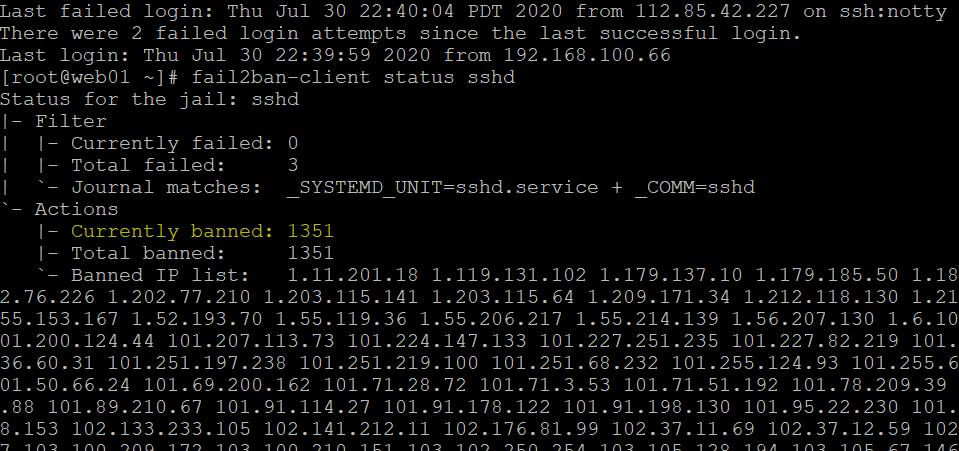
CentOS 8:
# Install
dnf install -y epel-release
dnf install -y fail2ban

# Configure to ban for 1 hour if ssh logins are incorrect 3 times in a row
localSubnets=$(ip -o -f inet addr show | awk '/scope global/ {print $4}')
function joinVariables { local IFS="$1"; shift; echo "$*"; }
cat > /etc/fail2ban/jail.local <<EOF
[DEFAULT]
ignoreip = $(joinVariables , $localSubnets)
bantime  = 3600
findtime  = 300
maxretry = 3
banaction = iptables-multiport
backend = systemd

[sshd]
enabled = true
EOF

# Set startup
systemctl start fail2ban
systemctl enable fail2ban
systemctl status fail2ban

# Validate that an IP is banned
ip=106.12.38.105
fail2ban-client status sshd | grep $ip

# Unban
$ip=x.x.x.x
fail2ban-client unban $ip
CentOS 7:
Install Fail2Ban
yum install epel-release -y
yum install fail2ban -y
Configure permanent bans
# Find IP of current connections
netstat -natp
vim /etc/fail2ban/jail.conf
### Set this ###
# "bantime" is the number of seconds that a host is banned.
# bantime  = 600 # 10 minutes

# Permanent ban
bantime = -1

# set IgnoreIP
ignoreip = 127.0.0.1/8 [otherNetworksHere]

# It's also recommended to ignore any other subnets that are trusted to to access this server
################
vim /etc/fail2ban/action.d/iptables-multiport.conf
##### Set Action Start #####

actionstart = iptables -N fail2ban-<name>
              iptables -A fail2ban-<name> -j RETURN
              iptables -I <chain> -p <protocol> -m multiport --dports <port> -j fail2ban-<name>
# Add these lines to load iptables:
          cat /etc/fail2ban/persistent.bans | awk '/^fail2ban-<name>/ {print $2}' \
          | while read IP; do iptables -I fail2ban-<name> 1 -s $IP -j <blocktype>; done
#
#
actionban = iptables -I fail2ban-<name> 1 -s <ip> -j <blocktype>
# Add this line - including the tab indent
    echo "fail2ban-<name> <ip>" >> /etc/fail2ban/persistent.bans
#
#########################
vim /etc/fail2ban/jail.local
#### insert these lines ####

[DEFAULT]
# Override /etc/fail2ban/jail.d/00-firewalld.conf:
banaction = iptables-multiport


[sshd]
enabled = true
banaction = iptables-multiport
bantime = -1 # or the number of seconds
maxretry = 0
# port = 22 # optional

# insert other services as needed
########
# Alternative configuration for temporary bans
vim /etc/fail2ban/jail.local
#### insert these lines ####
[DEFAULT]
# Ban hosts for one hour:
bantime = 3600

# Override /etc/fail2ban/jail.d/00-firewalld.conf:
banaction = iptables-multiport

[sshd]
enabled = true
########
Restart fail2ban
systemctl restart fail2ban
Check current bans
fail2ban-client status sshd
Set Fail2Ban Autostart
[rambo@testbox ~]# systemctl enable fail2ban
Created symlink from /etc/systemd/system/multi-user.target.wants/fail2ban.service to /usr/lib/systemd/system/fail2ban.service.
How to Unban an IP
# Find jail name of a specific IP on CentOS 7
iptables -n -L --line-numbers | grep $ip

# Sample output
131  REJECT     all  --  100.2.151.232        0.0.0.0/0            reject-with icmp-port-unreachable

# 131 is the jail name.
[admin@server ~]iptables -D fail2ban-jailname 131

# Unban IP from correct jail
fail2ban-client set sshd unbanip 172.17.0.4
