There are 3 methods:
1. hostnamectl command : using systemctl (recommended and shown at the bottom of this article)
2. nmtui command : using text user interface (TUI)
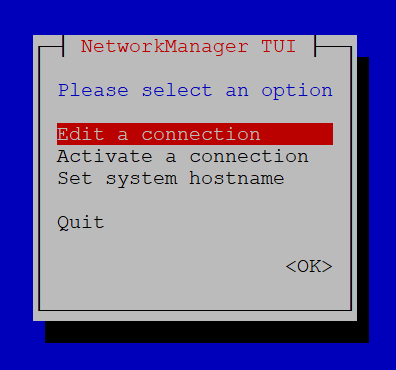
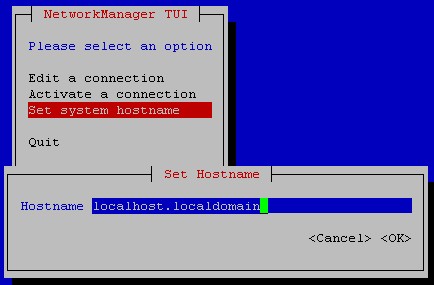
3. nmcli command : using CLI part of NetworkManager
nmcli general hostname NewHostname
# Method 1:

hostnamectl set-hostname "NewName" # Default - use this one for most purposes
hostnamectl set-hostname "New Pretty Name" --pretty
hostnamectl set-hostname "NewName" --static
hostnamectl set-hostname "NewName" --transient

# reload hostname daemon (changes will be reflected on next logon)
systemctl restart systemd-hostnamed
###### Ubuntu 20.04 ######
# View current hostname
lulu@webserver01:~$ hostnamectl
   Static hostname: webserver01
         Icon name: computer-desktop
           Chassis: desktop
        Machine ID: 8ff008ee9abf4fb58e3c65f390382c33
           Boot ID: d63dc53f44974fbc907cfa205e67f1bb
  Operating System: Ubuntu 20.04 LTS
            Kernel: Linux 5.4.0-31-generic
      Architecture: x86-64

# Change hostname
lulu@webserver01:~$ sudo hostnamectl set-hostname web01
[sudo] password for lulu:

# Verify changes
lulu@webserver01:~$ hostnamectl
   Static hostname: web01
         Icon name: computer-desktop
           Chassis: desktop
        Machine ID: 8ff008ee9abf4fb58e3c65f390382c33
           Boot ID: d63dc53f44974fbc907cfa205e67f1bb
  Operating System: Ubuntu 20.04 LTS
            Kernel: Linux 5.4.0-31-generic
      Architecture: x86-64
###### CentOS 8.1 ######
[coco@localhost ~]$ hostnamectl
   Static hostname: localhost.localdomain
         Icon name: computer-vm
           Chassis: vm
        Machine ID: 45db5efb4c3e41f48f61c6074e64e2ea
           Boot ID: 4b0f8d6e979f46d0827e91a2db69dcf8
    Virtualization: vmware
  Operating System: CentOS Linux 8 (Core)
       CPE OS Name: cpe:/o:centos:centos:8
            Kernel: Linux 4.18.0-147.el8.x86_64
      Architecture: x86-64
[coco@localhost ~]$ sudo hostnamectl set-hostname web02

We trust you have received the usual lecture from the local System
Administrator. It usually boils down to these three things:

    #1) Respect the privacy of others.
    #2) Think before you type.
    #3) With great power comes great responsibility.

[sudo] password for coco:
[coco@localhost ~]$ hostnamectl
   Static hostname: web02
         Icon name: computer-vm
           Chassis: vm
        Machine ID: 45db5efb4c3e41f48f61c6074e64e2ea
           Boot ID: 4b0f8d6e979f46d0827e91a2db69dcf8
    Virtualization: vmware
  Operating System: CentOS Linux 8 (Core)
       CPE OS Name: cpe:/o:centos:centos:8
            Kernel: Linux 4.18.0-147.el8.x86_64
      Architecture: x86-64
Categories: