Posted On November 3, 2021

Convert LastLogon Date From Number to Date Time

kimconnect 0 comments
blog.KimConnect.com >> Codes >> Convert LastLogon Date From Number to Date Time

We have a case where our Admins have generated a CSV file with information about user accounts with associated LastLogon date value as a machine numerical value, rather than the human readable date value. A convenient way of expressing that value would be as follows:

1. Create a new column with this formula (tested to work with Excel and Google Spreadsheets):

=IF(G2>0,G2/(8.64*10^11)-109205,"")

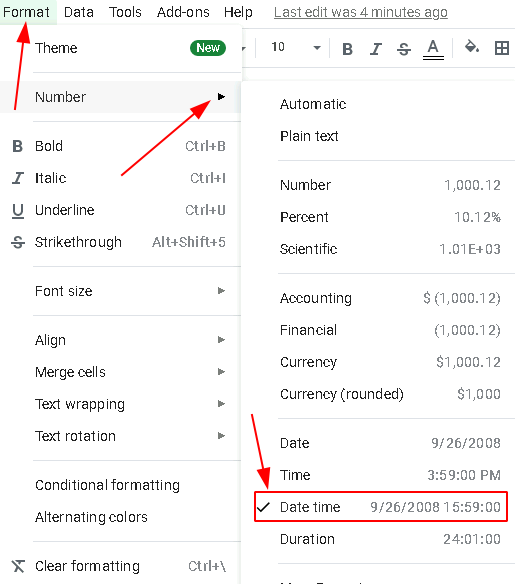
2. Format the new column as ‘Date time’ as illustrated below.
Leave a Reply

Your email address will not be published. Required fields are marked *

Related Post

PowerShell: Manage Remote Desktop Servers by Logging Off Idle Sessions That Have Certain Inactive Programs

# manageRdsSessions.ps1 # Sequence of workflow: # a. Gather active and disconnected sessions on all…

PowerShell: How To Bypass Double Hop Problems

# This is a working example of hoping without delegation. Fresh creds can be passed…

PowerShell: Microsoft Clustered Disks Creation Script v 0.10

Code: <# Microsoft_Clustered_Disks_Creation_V0.10.ps1Purpose:This snippet streamlines the process of creating physical disk volumes on a Windows…
