Posted On November 3, 2021

Convert LastLogon Date From Number to Date Time

kimconnect 0 comments
blog.KimConnect.com >> Codes >> Convert LastLogon Date From Number to Date Time

We have a case where our Admins have generated a CSV file with information about user accounts with associated LastLogon date value as a machine numerical value, rather than the human readable date value. A convenient way of expressing that value would be as follows:

1. Create a new column with this formula (tested to work with Excel and Google Spreadsheets):

=IF(G2>0,G2/(8.64*10^11)-109205,"")

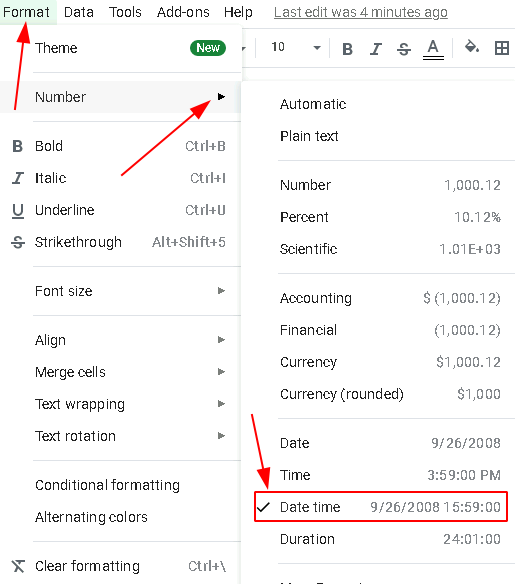
2. Format the new column as ‘Date time’ as illustrated below.
Leave a Reply

Your email address will not be published. Required fields are marked *

Related Post

How to Add a Replica into an Existing Availability Group using PowerShell

Overview:0. Add secondary replica to the cluster by running some commands on the availability group…

JavaScript: Build a Tic Tac Toe Game (without AI)

Demo: https://blog.kimconnect.com/wp-content/projects/ticTacToeGame.html CSS Code: @import url('https://fonts.googleapis.com/css?family=Merienda');body{ font-family: 'Merienda', cursive; font-weight: bold;}#gameBoard { width: 396px; //…

Installing Apache on Centos 7

The easy methodsudo yum clean allsudo yum -y updatesudo yum -y install httpd php-pearsudo firewall-cmd…
