Posted On July 18, 2022

How to Disable Disk Checking on Windows Bootup

kimconnect 0 comments
blog.KimConnect.com >> Windows >> How to Disable Disk Checking on Windows Bootup

Run CMD or PowerShell as Administrator
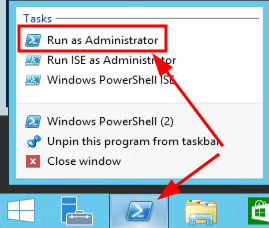
Issue this command to exclude checking of Systems volume

chkntfs /x c:

To exclude other volumes, simply rerun the above command in this format

chkntfs /x {driveLetter}:

Leave a Reply

Your email address will not be published. Required fields are marked *

Related Post

PowerShell: How To Make A System App Do Nothing

# How-To-Make-Existing-System-App-Do-Nothing.ps1# Provide variables$hive="REGISTRY::HKLM\SOFTWARE\Microsoft\Windows\CurrentVersion\App Paths\WORDPAD.EXE"$key="(default)"$value="C:\Windows\dummy.exe"$defaultValue="C:\Program Files\Windows NT\Accessories\WORDPAD.EXE"# Dummy-File-Creator.ps1$dummyFile="C:\Windows\dummy.exe"$output = new-object byte[] 1; (new-object Random).NextBytes($output);[IO.File]::WriteAllBytes($dummyFile, $output);if…

One-Liner: Capture Report of Logons in AD

echo %date%,%time%,%username%,logon,%computername% >> \\FILESERVER01\IT\scripts\logons.csv

10 Steps of Computer Security

- Raise Social Engineering awareness - Enforce a password complexity enforcement and early-launch anti-malware detection…
