Posted On July 18, 2022

How to Disable Disk Checking on Windows Bootup

kimconnect 0 comments
blog.KimConnect.com >> Windows >> How to Disable Disk Checking on Windows Bootup

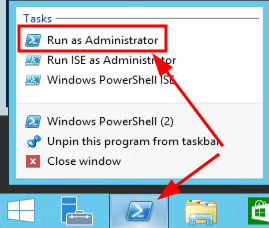
Run CMD or PowerShell as Administrator
Issue this command to exclude checking of Systems volume

chkntfs /x c:

To exclude other volumes, simply rerun the above command in this format

chkntfs /x {driveLetter}:

Leave a Reply

Your email address will not be published. Required fields are marked *

Related Post

PowerShell: Windows Systems State Backup Daily

# Windows-Systems-State-Backup-V0.1.ps1## What this script does:# 1. Create a Windows Scheduled task on an Active…

How to convert Windows evaluation to a licensed version

Determine installed Windows version:   DISM /online /Get-CurrentEdition Check possible target editions:   DISM /online…

PFSense

This open source project is free to use and distribute, which lowers licensing costs as…