Posted On April 3, 2019

Chronos Time Clock Administration

kimconnect 0 comments
blog.KimConnect.com >> Windows >> Chronos Time Clock Administration

How to Add Notes

  • Configuration Manager
  • Terminals
  • Timekeeper Terminals
  • right click – basic configuration
  • Type in the alternate text to show on time clock
  • When done open CommLink and communications and initilize

When looking at a timesheet:

F8 changes from actual to rounded

Changing schedules and timesheets

  • Open employees timesheet
  • click the little house (EMPLOYEE INFORMATION)
  • Make note of: Work-rule and primary schedule

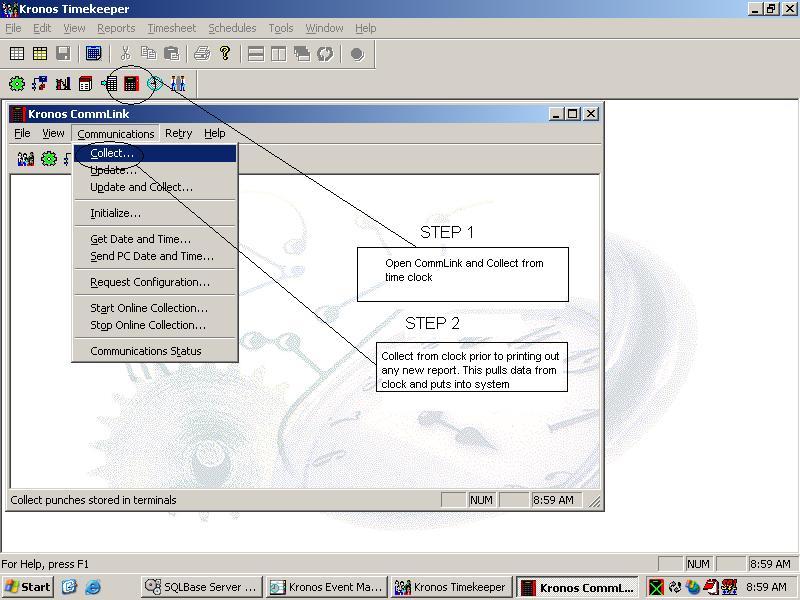
Chronos Collect Help
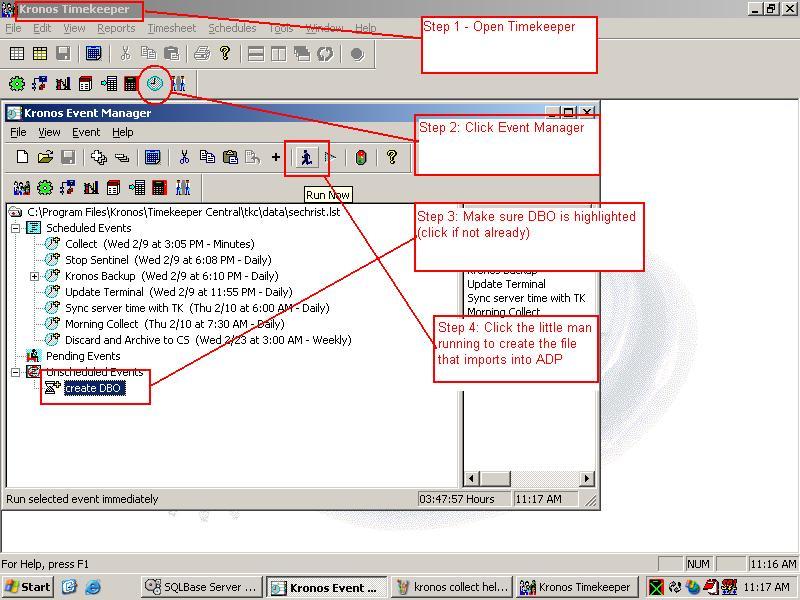
Closing: Import into ADP
Leave a Reply

Your email address will not be published. Required fields are marked *

Related Post

Some Batch Files

REM Date.batset fscfg=m:\mfgsys\fs.cfgm:\fs_apps\setcfg N0 DT_TODAY={TODAY} REM lexp.batfsguiapp.exe -s -cm:\mfgsys\fs.cfg -iAAA{TAB}y2k99{CR}bexe{ESC}exp{CR}exit Rem Invoice_Prints_ZZ1_2_3_.batfsguiapp.exe -cm:\mfgsys\fs.cfg -iZZ1{TAB}pass1{CR}bexe{ESC}zz1{CR}M:\cabsauto\timeout 15fsguiapp.exe…

Increase the Disk Timeout On Windows Servers

Windows Registry Editor Version 5.00[HKEY_LOCAL_MACHINE\SYSTEM\CurrentControlSet\Services\disk]"TimeOutValue"=dword:0000003cChange timeout value to 10 minutes:"TimeOutValue"=dword:00000258

Puppet Client Server Lab Setup

Server # Setup client machine name sudo vim /etc/hosts ## Insert this line ## xx.xx.xx.xx…
