Posted On April 3, 2019

Chronos Time Clock Administration

kimconnect 0 comments
blog.KimConnect.com >> Windows >> Chronos Time Clock Administration

How to Add Notes

  • Configuration Manager
  • Terminals
  • Timekeeper Terminals
  • right click – basic configuration
  • Type in the alternate text to show on time clock
  • When done open CommLink and communications and initilize

When looking at a timesheet:

F8 changes from actual to rounded

Changing schedules and timesheets

  • Open employees timesheet
  • click the little house (EMPLOYEE INFORMATION)
  • Make note of: Work-rule and primary schedule

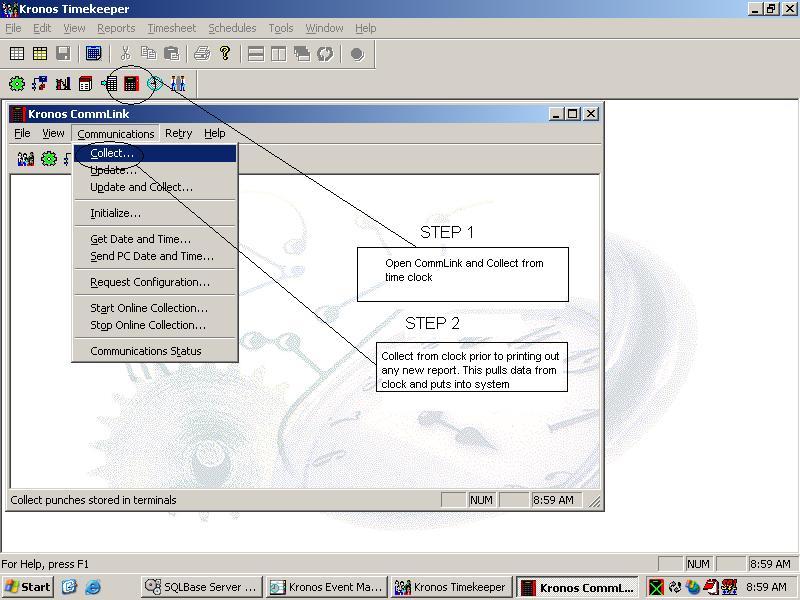
Chronos Collect Help
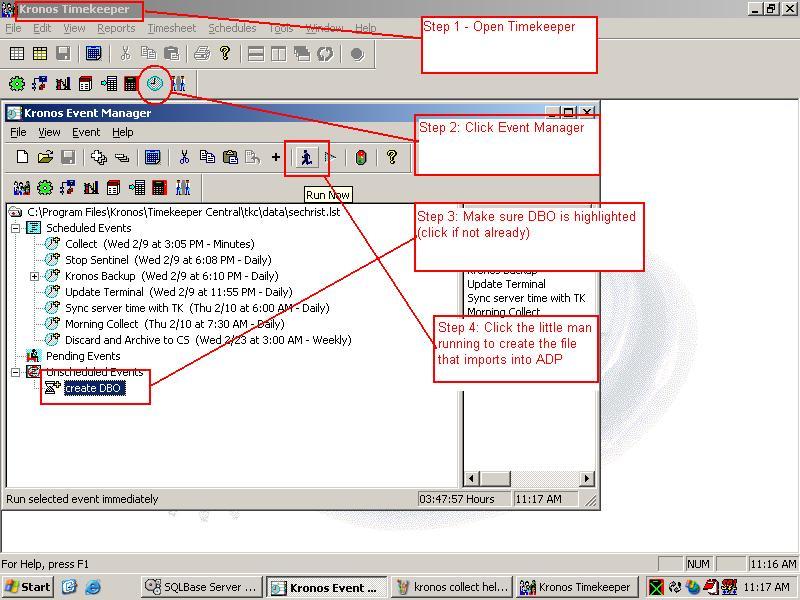
Closing: Import into ADP
Leave a Reply

Your email address will not be published. Required fields are marked *

Related Post

Make Changes to Network Shared Printer

From a Windows 7 Workstation, click Start >> Run >> \\SRVIFILE02 >> Enter >> click…

Typical Group Policies

Printers: set policy to automatically deploy printers, then allow logon to trigger the deployment and…

How to Block Distracting Sites Such as Youtube and Hulu on Your Home Network

Overview: - You send a voice command 'block youtube' to Alexa, an Amazon personal assistant…
