Posted On March 31, 2019

Wireless Optimal Setup

kimconnect 0 comments
blog.KimConnect.com >> Networking >> Wireless Optimal Setup
  1. Have multiple access point using the same SSID for best handover
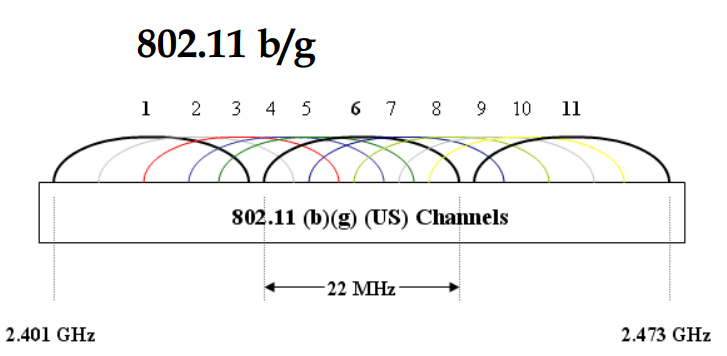
  2. Stagger channels 1, 6, and 11 for minimal interference
  3. Estimate the range of each AP so that those that are on the same channel are far away from each other

Leave a Reply

Your email address will not be published. Required fields are marked *

Related Post

Latency Rule of thumbs

     Excellent: < 1ms      Very good: < 5ms      Good: 5 – 10ms…

SonicWall Configuration for Asterisk

How to configure Sonicwall to enable traffic toward a on-premise VoIP server without VLAN  …

Common Windows Ports and Services

Port Protocol Application protocol System service name n/a GRE GRE (IP protocol 47) Routing and…