Posted On March 31, 2019

Wireless Optimal Setup

kimconnect 0 comments
blog.KimConnect.com >> Networking >> Wireless Optimal Setup
  1. Have multiple access point using the same SSID for best handover
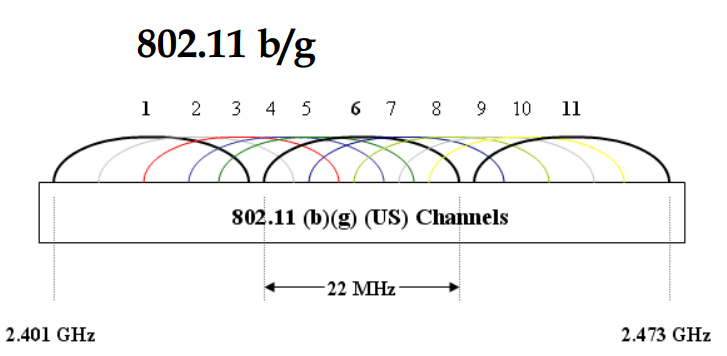
  2. Stagger channels 1, 6, and 11 for minimal interference
  3. Estimate the range of each AP so that those that are on the same channel are far away from each other

Leave a Reply

Your email address will not be published. Required fields are marked *

Related Post

Install FOG, an Open Source Machine Backup and Cloning Solution

- Install Ubuntu or Centos - Install FOG - On Windows Client, run sysprep, then…

Linux Networking: Manual Configurations

Ubuntu Systems /etc/resolv.conf specifies the nameservers for resolver lookups. The order of lookup is sequential…

HP Procurve Configure Time and Default Gateway

#configure gateway and NTPip default-gateway 10.10.10.1timesync sntpsntp unicastsntp 30# These are ntp.org servers for North…