Posted On January 14, 2020

Active Directory: How to Copy Account

kimconnect 0 comments
blog.KimConnect.com >> Windows >> Active Directory: How to Copy Account

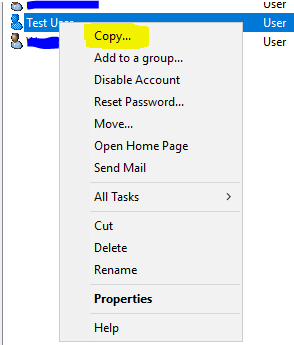
Run: DSA.MSC > navigate to the container of the user to be copied (e.g. Test User) > right-click the reference account > select “Copy…”
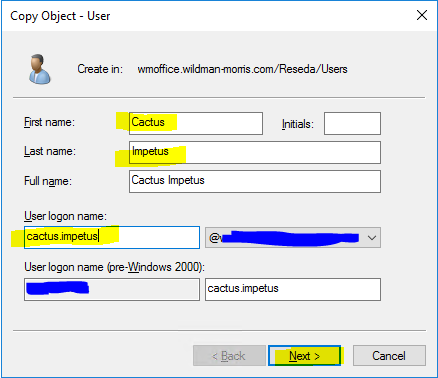
Input the fields: First name, Last name, User logon name > click Next
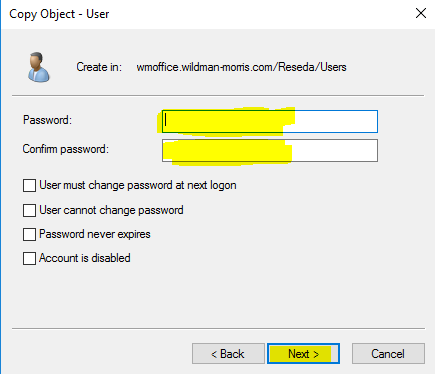
Set a temporary password for this new user > Next > OK
Leave a Reply

Your email address will not be published. Required fields are marked *

Related Post

PowerShell: Script to Obtain List of Sites and Associated Domain Controllers

Script: if (!(get-module -name "ActiveDirectory") ){Add-WindowsFeature RSAT-AD-PowerShell; import-module -name "ActiveDirectory" -DisableNameChecking | out-null }$sites=(Get-ADDomainController -filter…

How To Quickly Search a User in Active Directory by Matching Email

This one liner would do the trick: Get-ADUser -Filter {EmailAddress -eq '[email protected]'} PS C:\Windows\system32> Get-ADUser…

PowerShell: Enable ISE

Import-Module ServerManager;Add-WindowsFeature PowerShell-ISE
