Posted On January 14, 2020

Active Directory: How to Copy Account

kimconnect 0 comments
blog.KimConnect.com >> Windows >> Active Directory: How to Copy Account

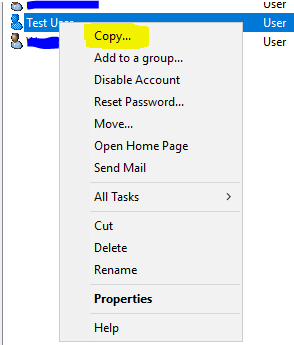
Run: DSA.MSC > navigate to the container of the user to be copied (e.g. Test User) > right-click the reference account > select “Copy…”
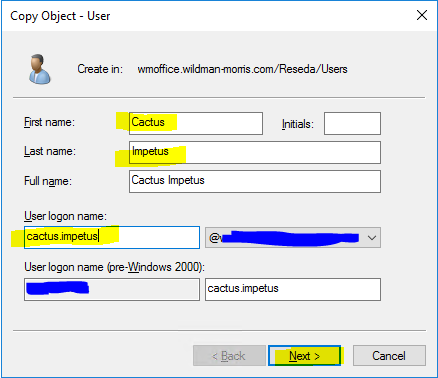
Input the fields: First name, Last name, User logon name > click Next
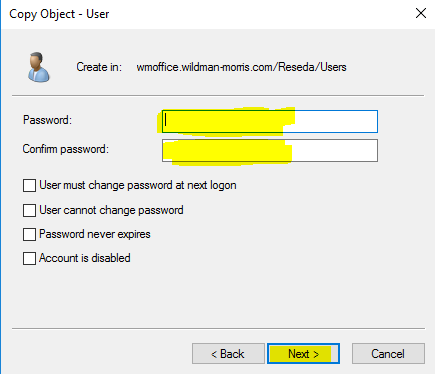
Set a temporary password for this new user > Next > OK
Leave a Reply

Your email address will not be published. Required fields are marked *

Related Post

WSUS Automatic Update Approval Settings

In Update Rules, click New Rule. In the Add Rule dialog box, under Step 1:…

A Short List of Windows Remote Desktop Server Error Messages

Log Messages: 'Failed GetConnectionProperty' in CUMRDPConnection::QueryProperty at 2884 err=[0x80004001]'Connection doesn't support logon error redirector' in…

Exchange relays settings Open the Exchange System Manager

Exchange relays settings Open the Exchange System Manager; Go in Administrative Groups -> Administrative group…
