Posted On September 10, 2020

Filezilla SFTP Connection ‘FATAL ERROR: Network error: Software caused connection abort’

kimconnect 0 comments
blog.KimConnect.com >> Networking >> Filezilla SFTP Connection ‘FATAL ERROR: Network error: Software caused connection abort’

Symptom:

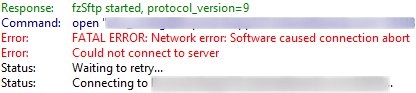
  • fzSftp started, protocol_version=9
    FATAL_ERROR: Network error: Software caused connection abort
    Could Not connect to server
Path to resolution:

  • Ensure that the correct port was used
  • Run test-netconnection $computername -port $portNumber to verify that port and network route are available
  • Check the firewall. For example, Sonicwall has this feature ‘Remote-Access SSH Generic Protocol Detection’ that would block certain contents.

Leave a Reply

Your email address will not be published. Required fields are marked *

Related Post

Sample: AWS & Satellite Subnets

    Web Tier App Tier Data Tier Zone A 172.31.0.0/20 172.31.64.0/24 172.31.128.0/24 Zone B…

CCIE Exam Day Overview

1. Network Principles 2. Layer 2 Technologies: LAN switching & WAN Circuits, layer 2 multicast…

A Simple Home Network Setup Using SonicWall & Ubiquiti Equipment

Overview: Internet Service Providers would terminate their wiring at the customer premise equipments (CPE) as…
