Posted On September 10, 2020

Filezilla SFTP Connection ‘FATAL ERROR: Network error: Software caused connection abort’

kimconnect 0 comments
blog.KimConnect.com >> Networking >> Filezilla SFTP Connection ‘FATAL ERROR: Network error: Software caused connection abort’

Symptom:

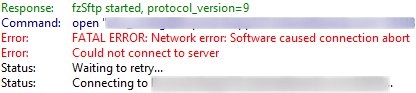
  • fzSftp started, protocol_version=9
    FATAL_ERROR: Network error: Software caused connection abort
    Could Not connect to server
Path to resolution:

  • Ensure that the correct port was used
  • Run test-netconnection $computername -port $portNumber to verify that port and network route are available
  • Check the firewall. For example, Sonicwall has this feature ‘Remote-Access SSH Generic Protocol Detection’ that would block certain contents.

Leave a Reply

Your email address will not be published. Required fields are marked *

Related Post

Home OpenVPN Stuff

Config file: To Be Generated OpenVPN Client:   Note: there's an error with the Asus…

RJ45 Ethernet & RJ11 Telephone Cables

There are three options to Ethernet cable wiring: T568-A, T568-B, and cross-over. AT&T & other…

Intermittent Ping Request Time Out Due to An Outdated ARP Table Entry of a Ubuntu Server

Scenario: - Server A and Server B hardware are of the same model and capacity-…
