Posted On October 6, 2020

Redirecting Microphone through Remmina RDP Sessions

kimconnect 2 comments
blog.KimConnect.com >> Linux >> Redirecting Microphone through Remmina RDP Sessions

Update 11/29/2020: the ‘redirect local microphone’ option is now simply a check-mark on Remmina version 1.4.2. There’s no longer a need to paste these lines as shown below.

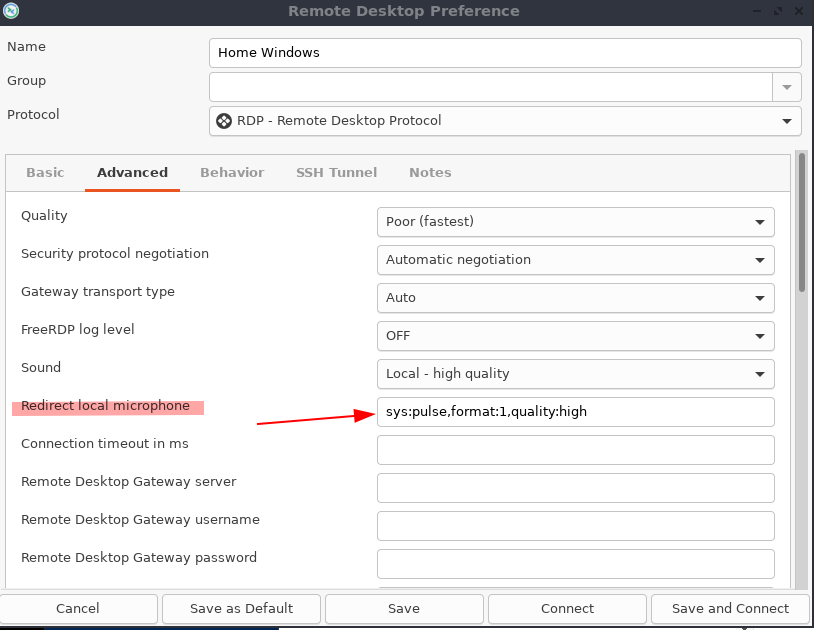
On certain linux hosts, microphones may not automatically pass through RDP sessions being facilitated by Remmina. In which case, it’s necessary to manually input one of these 2 values (not both) in the RDP config window:

sys:pulse,format:1,quality:high
sys:alsa,format:1,quality:high
2 thoughts on “Redirecting Microphone through Remmina RDP Sessions”

Leave a Reply

Your email address will not be published. Required fields are marked *

Related Post

Linux: ‘Initramfs Unpacking Failed’ Error Upon Booting

Error: initramfs unpacking failed: Decoding failed Resolution: sudo sed -i 's/COMPRESS=lz4/COMPRESS=gzip/g' /etc/initramfs-tools/initramfs.confsudo update-initramfs -u# reboot…

NGINX

# Create nginx.repovim /etc/yum.repos.d/nginx.repo#### content ####[nginx]name=nginx repo baseurl=http://nginx.org/packages/mainline/centos/$releasever/$basearch/ gpgcheck=0 enabled=1###############sudo yum update nginxsudo service nginx…

How To Install Rancher Onto a Kubernetes Cluster

Step 1: Add Rancher Repo into Helm Source: https:// rancher.com/docs/rancher/v2.x/en/installation/install-rancher-on-k8s/ # Add Rancher repo helm…
Other project: DragonCoin.com