Posted On December 31, 2020

How To Install Microsoft Edge on Ubuntu / Debian / Linux Mint

kimconnect 0 comments
blog.KimConnect.com >> Linux >> How To Install Microsoft Edge on Ubuntu / Debian / Linux Mint

Step 1: Add Microsoft Repository

curl https://packages.microsoft.com/keys/microsoft.asc | gpg --dearmor > microsoft.gpg
sudo install -o root -g root -m 644 microsoft.gpg /etc/apt/trusted.gpg.d/
sudo sh -c 'echo "deb [arch=amd64] https://packages.microsoft.com/repos/edge/ stable main" > /etc/apt/sources.list.d/microsoft-edge-dev.list'
sudo rm microsoft.gpg

Step 2: Install Microsoft Edge

sudo apt update -y
sudo apt install microsoft-edge-dev -y

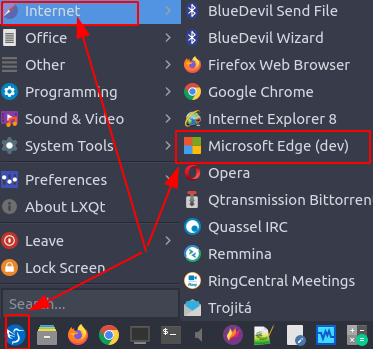
Step 3: Run Edge
 

Leave a Reply

Your email address will not be published. Required fields are marked *

Related Post

File Searching in Linux

Step 1 Index your file system with updatedb. This makes a list of files so…

How to fix outdated and unsupported Ubuntu versions

rooty@FOGSERVER01$ lsb_release -aNo LSB modules are available.Distributor ID: UbuntuDescription: Ubuntu 13.10Release: 13.10Codename: saucyUbuntu 13.10 (Saucy…

Linux Mint /dev/sda1 Out of Space Issue

Issue: "sudo apt --fix-broken install"leads to something such as:"dpkg: error processing archive /var/cache/apt/archives/linux-image-6.8.0-87-generic_6.8.0-87.88~22.04.1_amd64.deb(--unpack):cannot copy extracted…