Posted On December 31, 2020

How To Install Microsoft Edge on Ubuntu / Debian / Linux Mint

kimconnect 0 comments
blog.KimConnect.com >> Linux >> How To Install Microsoft Edge on Ubuntu / Debian / Linux Mint

Step 1: Add Microsoft Repository

curl https://packages.microsoft.com/keys/microsoft.asc | gpg --dearmor > microsoft.gpg
sudo install -o root -g root -m 644 microsoft.gpg /etc/apt/trusted.gpg.d/
sudo sh -c 'echo "deb [arch=amd64] https://packages.microsoft.com/repos/edge/ stable main" > /etc/apt/sources.list.d/microsoft-edge-dev.list'
sudo rm microsoft.gpg

Step 2: Install Microsoft Edge

sudo apt update -y
sudo apt install microsoft-edge-dev -y

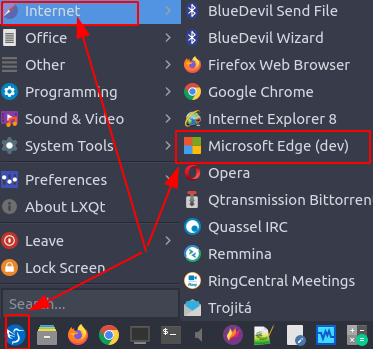
Step 3: Run Edge
 

Leave a Reply

Your email address will not be published. Required fields are marked *

Related Post

Fix Ubuntu / Lubuntu ‘Hypernation Button Does Nothing’ Problem

# Step 0: find swap # Option A: root@kimlinux:/home/kim# cat /proc/swaps Filename Type Size Used…

Sample Multi-Site Metadata

SimpleSAML PHP module requires that each site to be configured with a $metadata entry. Below…

Run Memory Tester On Ubuntu 20.04

GNU Grub 2.04 does have memtest86+ that could be used to perform RAM load tests.…