Posted On January 23, 2021

Ubuntu: Disable Annoying Update Notifier

kimconnect 0 comments
blog.KimConnect.com >> Linux >> Ubuntu: Disable Annoying Update Notifier

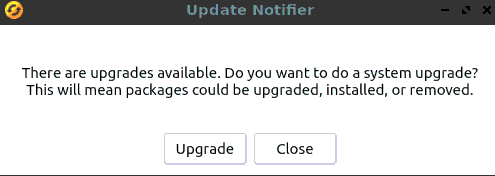
Want to get rid of this?
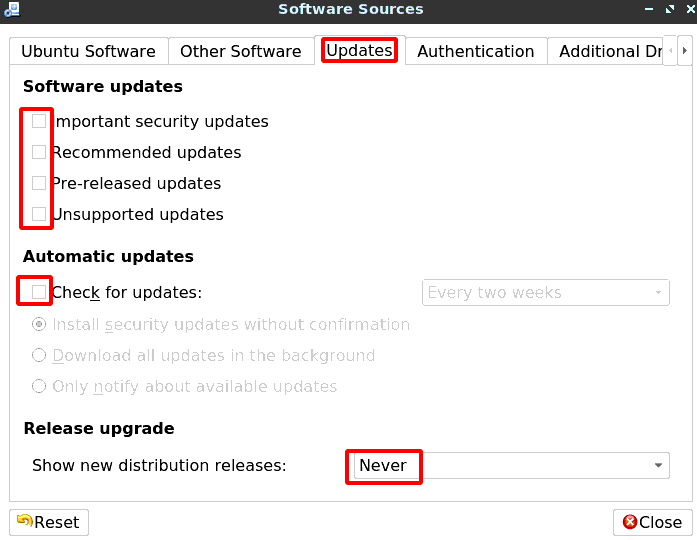
Ubuntu: Go to System > Administration > Software Sources (or run: software-properties-qt) > select the Updates tab > untick all check-boxes > close
Leave a Reply

Your email address will not be published. Required fields are marked *

Related Post

Linux: How to Find USB Thumb Drive via CLI

0. Trigger SCSI Device Scans # Scan all SCSI host controllers # If a new…

Networking: Upgrading Legacy Ubiquiti Devices

Step 1: obtain the bin URL from https://www.ui.com/download/unifi/unifi-ap/uaplr Step 2: perform the upgrade rambo@kimlinux:/home/rambo# ssh…

Linux: How to Manually Create a USB Bootable Drive for ESXi

Step 1: Find the USB mount root@kimlinux:/home/kim# ls /dev/s*/dev/sda /dev/sdb1 /dev/sdb3 /dev/sdc1 /dev/sg1 /dev/snapshot /dev/stdin/dev/sdb…
