Posted On November 9, 2020

Active Directory: Helpdesk Admins Group Creation

kimconnect 0 comments
blog.KimConnect.com >> Windows >> Active Directory: Helpdesk Admins Group Creation
Why?

Give your helpdesk team the ability to manage user accounts in the domain without being a member of the Domain Admins group.

How?
  1. Create a group named ‘Helpdesk Admins’ and add all the Helpdesk users accounts intended with such role
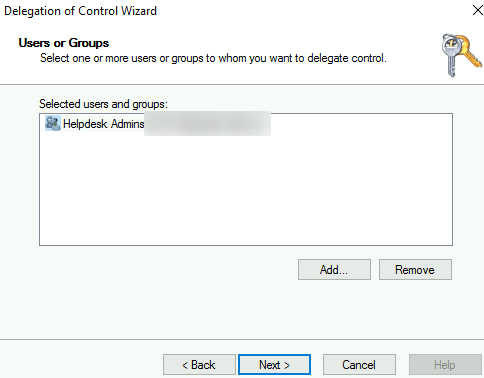
  2. Run ADUC > Navigate to OU where permissions are to be granted (or root directory for entire domain delegation) > Delegate Control > Next > Add > search for ‘Helpdesk Admins’ > OK

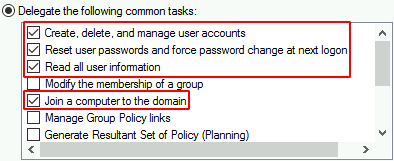
    Next > select ‘Create, Delete, and Manage User Accounts’, ‘Reset user passwords and force password change at next logon’, ‘Read all user information’, ‘Modify the membership of a group’,’Join a computer to the domain’
    Next > Finish

Leave a Reply

Your email address will not be published. Required fields are marked *

Related Post

Office 365 Email Security for SMTP Relays

Error message: Unable to read data from the transport connection: net_io_connectionclosed. Troubleshooting steps: Ensure that…

Windows Error When Joining Domain

Error Message: ---------------------------Computer Name/Domain Changes---------------------------Changing the Primary Domain DNS name of this computer to ""…

Make Changes to Network Shared Printer

From a Windows 7 Workstation, click Start >> Run >> \\SRVIFILE02 >> Enter >> click…
