View existing ADFS global configs
PS C:\Users\administrator.CAP> get-AdfsGlobalWebContent

SignOutPageDescriptionText :
UpdatePasswordPageDescriptionText :
Locale :
CompanyName :
CertificatePageDescriptionText :
ErrorPageDescriptionText :
ErrorPageGenericErrorMessage :
ErrorPageAuthorizationErrorMessage :
ErrorPageDeviceAuthenticationErrorMessage :
ErrorPageSupportEmail :
HelpDeskLink :
HelpDeskLinkText :
HomeLink :
HomeLinkText :
HomeRealmDiscoveryOtherOrganizationDescriptionText :
HomeRealmDiscoveryPageDescriptionText :
OrganizationalNameDescriptionText :
PrivacyLink :
PrivacyLinkText :
SignInPageDescriptionText :
SignInPageAdditionalAuthenticationDescriptionText :
Enable Self Service Password Changes
Run: $env:windir\ADFS\Microsoft.IdentityServer.msc > AD FS > Service > Endpoints > scroll toward the bottom > right-click ‘/adfs/portal/updatepassword/’ > Enable > OK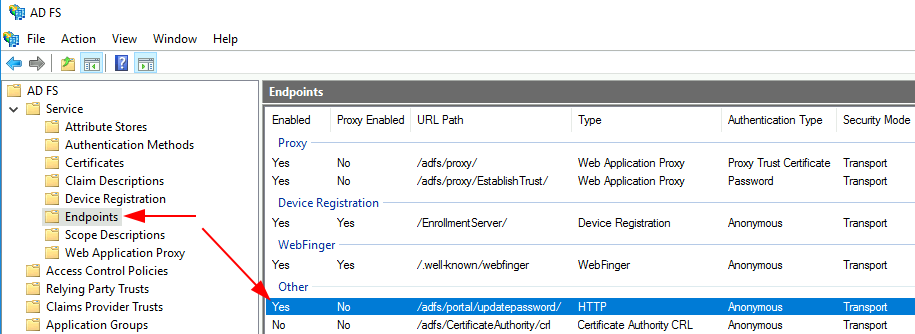
Configure other variables:
$companyName='Hooli'
$baseUrl='https://hooli.kimconnect.com'
$logoFile='C:\AdfsContents\logo.png'
$helpDeskUrl="$baseUrl/help/"
$signInUrl="$baseUrl/deviceregistration/"
$signInDescription="<p>Sign-in to $companyName requires device registration. Click <A href='$signInUrl'>here</A> for more information.</p>"
$homePage="$baseUrl/home/"
$privacyPage="$baseUrl/privacy/"
$updatePasswordPageDescription="For further assistance, contact us at [email protected]"
$passwordUpdateLink="$baseUrl/updatepassword"

# Change Logo
Set-AdfsWebTheme -TargetName default -Logo @{path="$logoFile"}

# Set logo text
Set-AdfsGlobalWebContent -CompanyName "$companyName Login" -UpdatePasswordPageDescriptionText $updatePasswordPageDescription

# Change Sign-in Page Description
Set-AdfsGlobalWebContent -SignInPageDescriptionText $signInDescription

# Helpdesk Link - this is being replaced by the Password Update Link
# Set-AdfsGlobalWebContent -HelpDeskLink $helpDeskUrl -HelpDeskLinkText Help

# Alternate helpdesk link
$helpDeskEndpoint = New-AdfsSamlEndpoint -Binding "POST" -Protocol "SAMLAssertionConsumer" -Uri $helpdeskUrl
Set-AdfsRelyingPartyTrust -TargetName "Helpdesk" -SamlEndpoint $helpDeskEndpoint

# Password Update Link
Set-AdfsGlobalWebContent -HelpDeskLink $passwordUpdateLink -HelpDeskLinkText "Update Password"

# Update Password Page's Description
Set-AdfsGlobalWebContent -UpdatePasswordPageDescriptionText "This is the $companyName Update Password page."

# Link to Home Page
Set-AdfsGlobalWebContent -HomeLink $homePage -HomeLinkText Home

# Privacy Link
Set-AdfsGlobalWebContent -PrivacyLink $privacyPage -PrivacyLinkText Privacy
Sources:
- https://learn.microsoft.com/en-us/previous-versions/windows/it-pro/windows-server-2012-R2-and-2012/dn280950(v=ws.11)
- https://learn.microsoft.com/en-us/powershell/module/adfs/new-adfssamlendpoint?view=windowsserver2022-ps&viewFallbackFrom=win10-ps
Categories:
