Error message:
The DFS Replication service detected that the local path of a replicated folder domain in its database does not match the newly configured local path C:\Windows\SYSVOL\domain of the replicated folder SYSVOL Share. The service will replicate the new path, and the old replicated folder path in the database will no longer be tracked as a replicated folder. Event ID: 6406
Resolution
– Move all FSMO roles to Primary Domain Controller Emulator (PDCE)
– Set PDC as “authoritative” source of Distributed File System Replication (DFS-R) and disable PDC from Replication Group using ADSIEdit.msc
– Demote problematic DC: uninstall AD Services > Reinstall AD Services > Re-promote DC with instructions to synchronize with PDC (no default)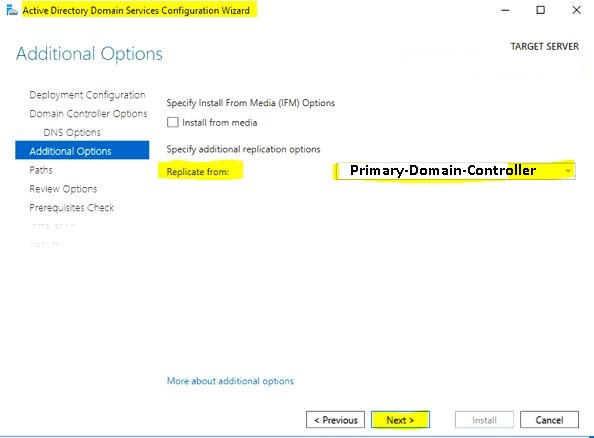
– Check RPC access from AD01 using this script
– Re-enable PDC as member of DFS-R Group for Sysvol
– Create a test GP
– Trigger Replication using this script
– Verify that Sysvol with newly generated GP has been replicated between DCs successfully
Source reading materials:
– https://learn.microsoft.com/en-us/troubleshoot/windows-server/networking/troubleshoot-missing-sysvol-and-netlogon-shares
– https://learn.microsoft.com/en-us/troubleshoot/windows-server/group-policy/force-authoritative-non-authoritative-synchronization
– https://learn.microsoft.com/en-us/troubleshoot/windows-server/networking/troubleshoot-missing-sysvol-and-netlogon-shares
– https://learn.microsoft.com/en-us/troubleshoot/windows-server/group-policy/force-authoritative-non-authoritative-synchronization
– https://learn.microsoft.com/en-us/troubleshoot/windows-server/active-directory/replication-error-1722-rpc-server-unavailable
– https://www.drivereasy.com/knowledge/rpc-server-is-unavailable-error-on-windows-10-fixed/
– https://learn.microsoft.com/en-us/windows-server/remote/remote-access/ras/manage-remote-clients/install/step-2-configure-the-remote-access-server
Errors during promotion:
The operation failed because:

The path chosen for the system volume is not accessible. Please either manually delete the contents of the path or choose another location for the system volume.

"Access is denied."
The fix:
Manually remove the “C:\Windows\SYSVOL\sysvol\{domainname.ltd}” or “C:\Windows\SYSVOL\sysvol” directory, then retry DC promotion.
