Posted On April 5, 2019

Exchange 2010: How to Increase Mailbox Quota for Individual Users

kimconnect 0 comments
blog.KimConnect.com >> Windows >> Exchange 2010: How to Increase Mailbox Quota for Individual Users

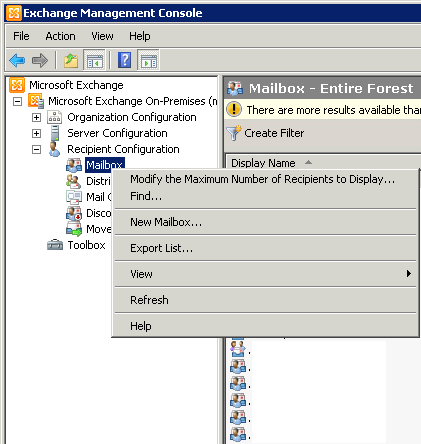
Exchange Management Console > Recipient Configuration > Right-click on Mailbox > Find
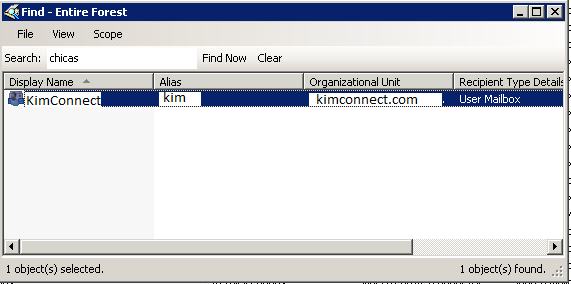
Input the username in the Search Field > click Find Now
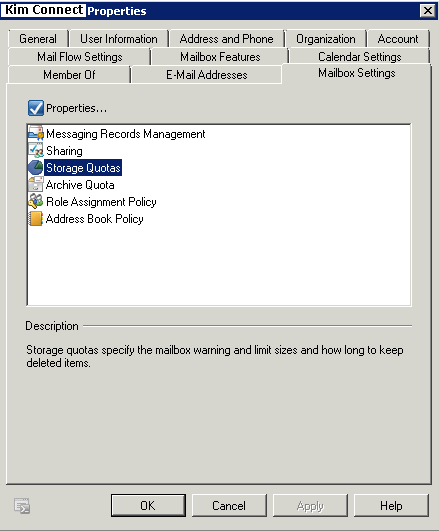
Click on Mailbox Settings tab > select Storage Quotas
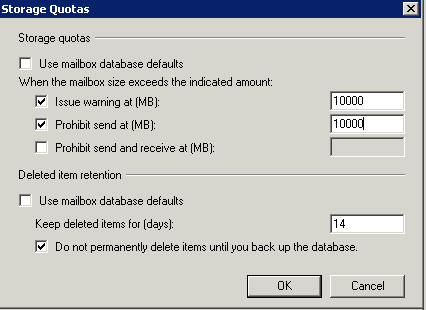
Click on Properties > Storage Quotas window appears > change the values corresponding to Issue warning at (MB) > OK
Leave a Reply

Your email address will not be published. Required fields are marked *

Related Post

Security Updates for Windows 10 / Windows Server 2016 / Windows Server 2019 (March 2019) (Spectre) (Meltdown) (Foreshadow)

Description The remote Windows host is missing a security update. It is, therefore, missing microcode…

PowerShell: Disable Windows Defender

Simultaneous Uninstalls: # removeWindowsDefender.ps1 # Version 0.02 $computerNames=@( 'server1', 'server2' ) function removeWindowsDefender($computerNames){ function uninstallWindefend($computername){…

Members of ‘Remote Desktop Users’ Not Included in the ‘Allow log on through Remote Desktop Services’ List

Error Message: To sign in remotely, you need the right to sign in through Remote…