OneSyncSvc is the parent object of OneSyncSvc_#####, and Sync Host_##### is the child’s display name.
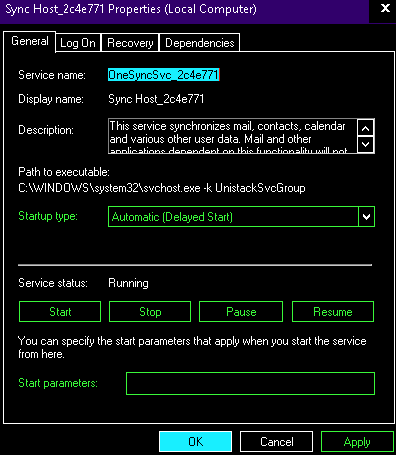
The startup type of this service cannot be changed via services.msc. This error would occur if one would make that attempt:
---------------------------
Services
---------------------------
The delayed auto-start flag could not be reset.

Error 87: The parameter is incorrect.

---------------------------
OK
---------------------------
Hence, modifications would require registry editing. Here’s how to view the service’s current properties:
# Query OneSyncService
$regKeyOneSync='REGISTRY::HKLM\system\currentcontrolset\services\onesyncsvc'
gi $regKeyOneSync

# PS C:\Windows\system32> $regKeyOneSync='REGISTRY::HKLM\system\currentcontrolset\services\onesyncsvc'
# PS C:\Windows\system32> gi $regKeyOneSync

# Hive: HKLM\system\currentcontrolset\services

# Name Property
# ---- --------
# onesyncsvc DisplayName : @%SystemRoot%\system32\APHostRes.dll,-10002
# ErrorControl : 0
# ImagePath : C:\Windows\system32\svchost.exe -k UnistackSvcGroup
# Start : 2
# Type : 96
# Description : @%SystemRoot%\system32\APHostRes.dll,-10001
# ObjectName : LocalSystem
# ServiceSidType : 1
# RequiredPrivileges : {SeCreateGlobalPrivilege}
# DelayedAutoStart : 1
# FailureActions : {128, 81, 1, 0...}
This is the command to disable such service (reboot required):
# Disable OneSyncSvc on Startup
$disableValue=4
REG.EXE ADD $regKeyOneSync /v Start /t REG_DWORD /d $disableValue /f
Categories:

Vic
Onedrive: Spy by default, give complicated registry edit to shut down, slows computer. Gives error if try to shut down synching service in services app.
kimconnect
From your comment, it seems that Microsoft has prioritized business profits over technical freedom of users.