Get Version of new SQL server

Create a sql-dump script on the old SQL server:
Run SQL Management Studio (“C:\Program Files (x86)\Microsoft SQL Server\140\Tools\Binn\ManagementStudio\Ssms.exe”) > right-click DB > Tasks > Generate Scripts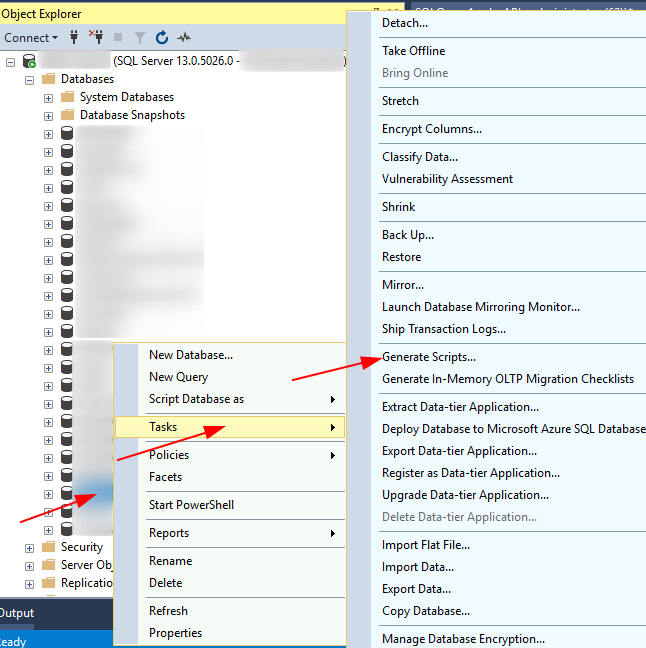
Choose Objects > ‘Script entire database and all database objects’ > Next > Advanced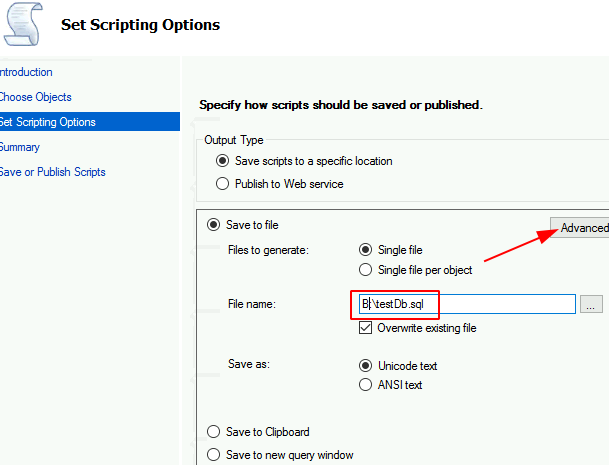
Target the correct database version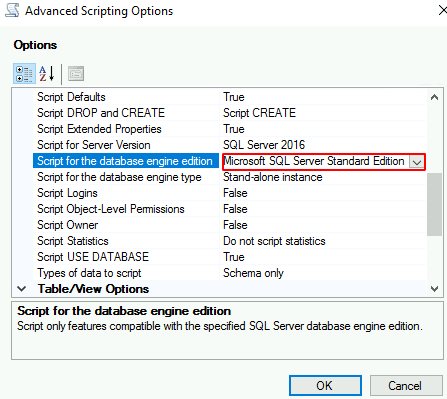
Set SQL Server version to match the target > Types of data to script option=Schema and data > Script Logins=True > Script Full-Text Indexes=True > Script Triggers=True > OK > Next > Next > Finish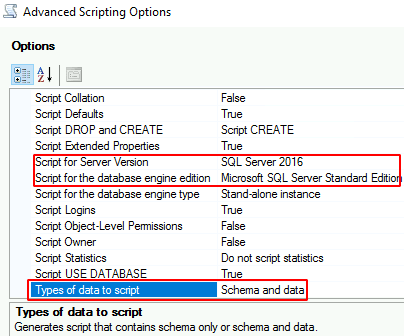
Execute Script on New Server:
Fix Database paths before execution:
USE [master]
GO
/****** Object: Database [testDb] Script Date: 11/3/2018 5:10:13 PM ******/
CREATE DATABASE [testDb]
CONTAINMENT = NONE
ON PRIMARY
( NAME = N'testDb', FILENAME = N'D:\Program Files\Microsoft SQL Server\MSSQL13.MSSQLSERVER\MSSQL\Data\testDb.mdf' , SIZE = 598016KB , MAXSIZE = UNLIMITED, FILEGROWTH = 65536KB )
LOG ON
( NAME = N'testDb_log', FILENAME = N'D:\Program Files\Microsoft SQL Server\MSSQL13.MSSQLSERVER\MSSQL\Data\testDb.ldf' , SIZE = 73728KB , MAXSIZE = 2048GB , FILEGROWTH = 65536KB )
GO
ALTER DATABASE [testDb] SET COMPATIBILITY_LEVEL = 130
GO
Use PowerShell to invoke SQL Query:
Invoke-Sqlcmd -InputFile "B:\Backups\testDb.sql" | Out-File -FilePath "B:\Backups\testDb.rpt"
Categories:
