Posted On July 9, 2020

Hyper-V UEFI Error: The Image’s Hash and Certificate are Not Allowed (DB)

kimconnect 0 comments
blog.KimConnect.com >> Virtualization >> Hyper-V UEFI Error: The Image’s Hash and Certificate are Not Allowed (DB)
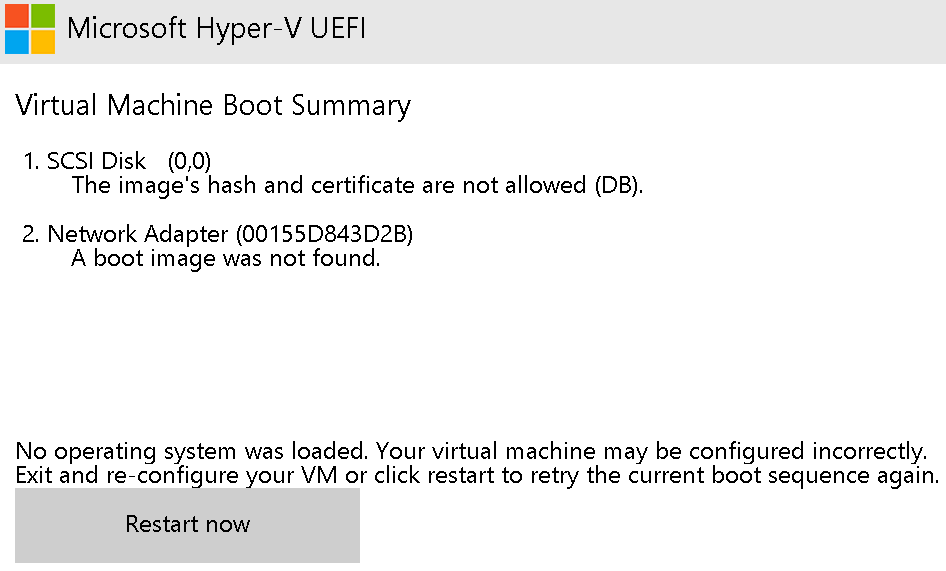
Symptom:

Cause:

Secure Boot has been enabled on this generation 2 guest virtual machine. This occurs when a VM has been cloned from a VHDX file using default options of ‘gen2’ para-virtual hardware.

Resolution:

Edit the VM’s setting to remove the check-mark next to ‘Enable secure boot’
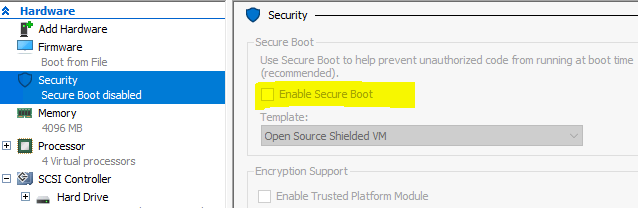
Alternatively, run this PowerShell command as Admininistrator:

Set-VMFirmware -VMName $newVmName -DisableSecureBoot

Leave a Reply

Your email address will not be published. Required fields are marked *

Related Post

Virtual Machine Manager Error ID 23351 FirstBootDevice Invalid

When moving, importing, exporting Generation 2 template in VMM, the following error occurs when trying…

PowerShell: Overcome Issues with Error 13932 in SCVMM When Refreshing Virtual Machines

Dealing with Clusters # refreshCluster.ps1 # Function to refresh a cluster in VMM in anticipation…

Install vCenter

- Download VMware-VCSA-all-6.0.0-2656757.iso - Download VirtualCloneDrive - Mount VCSA as virtual CD ROM - Disable…