
Quick Script:
# fixIncompleteVmConfig.ps1

$IncompleteVMConfig=Get-SCVirtualMachine|?{$_.StatusString -eq 'Incomplete VM Configuration'}
if($IncompleteVMConfig.count){
  foreach($vm in $IncompleteVMConfig){
    try{
      write-host "Fixing $($vm.Name)..."
      $vm|refresh-vm
      $dvd=Get-SCVirtualDVDDrive -VM $vm
      if ($null -ne $dvd.Connection -and $dvd.Connection -ne 'None') {
        Set-SCVirtualDVDDrive -VirtualDVDDrive $dvd -NoMedia
      }
    }catch{
      write-warning $_
    }
  }
}
Errors related to this issue:
refresh-vm : VMM could not find the specified path C:\win10iso\KMS
SW_DVD9_Win_Pro_10_20H2.2_64BIT_English_Pro_Ent_EDU_N_MLF_-2_X22-46651.ISO on the HYPERV-NODE25 server.
(Error ID: 2904, Detailed Error: The system cannot find the path specified (0x80070003))

Ensure that you have specified a valid file name parameter, and then try the operation again.

To restart the job, run the following command:
PS> Restart-Job -Job (Get-VMMServer localhost | Get-Job | where { $_.ID -eq "{fce569ca-bd01-4493-b27c-e3a433cee5f4}"})
At line:1 char:38
+ $incompleteVmConfigs|select -first 1|refresh-vm -force
+ ~~~~~~~~~~~~~~~~~
+ CategoryInfo : ReadError: (:) [Read-SCVirtualMachine], CarmineException
+ FullyQualifiedErrorId : 2904,Microsoft.SystemCenter.VirtualMachineManager.Cmdlets.RefreshVmCmdlet
Resolution:
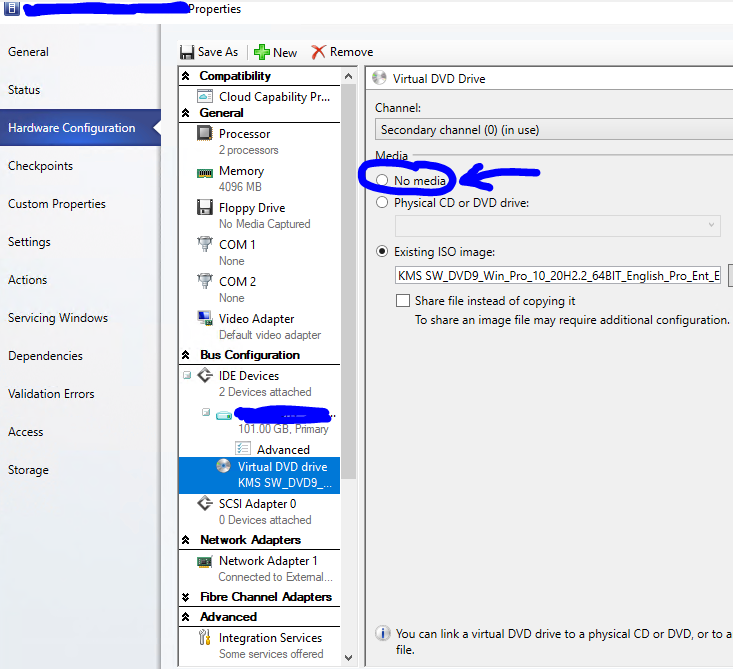
Remove the virtual DVD ISO that is being attached to the guest VM.
Categories:
