Hyper terminal is still useful as a tool to connect to network devices such as Cisco, Juniper, and HP. In the past, I’ve set up a Pentium III laptop that runs on Windows XP, to be connected to the lab network rack. I’ve used RDP to connect to that laptop and installed various networking applications such as Hyper Terminal in the procedure below:
Installation:
1. Click on START
2. Click on RUN
3. Paste this line and press [Enter]: RUNDLL32 ADVPACK.DLL,LaunchINFSection %windir%\INF\communic.inf,Hypertrm
4. Click OK on the confirmation pop-up
Removal:
1. Click on START
2. Click on RUN
3. Paste this line and press [Enter]: RUNDLL32 ADVPACK.DLL,LaunchINFSection %windir%\INF\communic.inf,HypertrmUninstall
4. Click OK on the confirmation pop-up
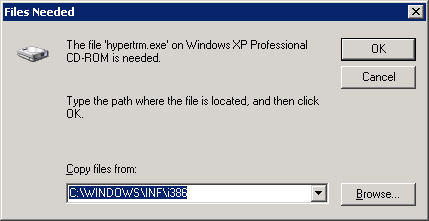
Please note that the original Windows XP CD ROM may be required to complete the installation if a prompt similar to this is being presented:
Categories:
