Issue:
Certain virtual machines would loose their a-host records after a period of time. That would lead to such machines being inaccessible by users by computer names.
Investigation:
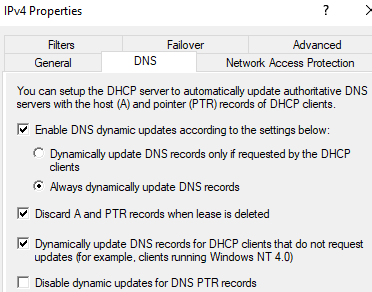
DHCP Server Settings:
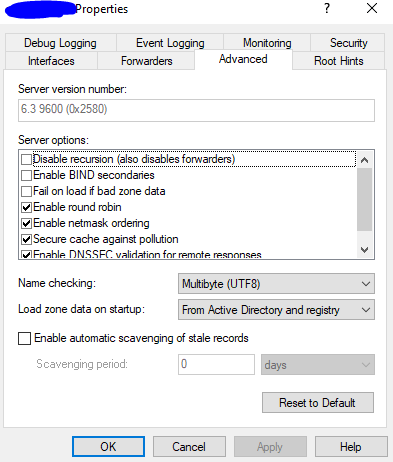
DNS Server Settings:
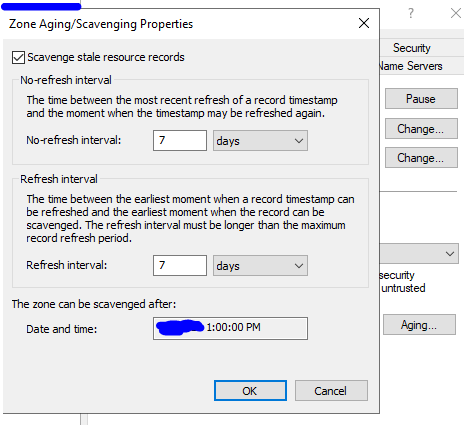
DNS Zone Settings
A-host record settings
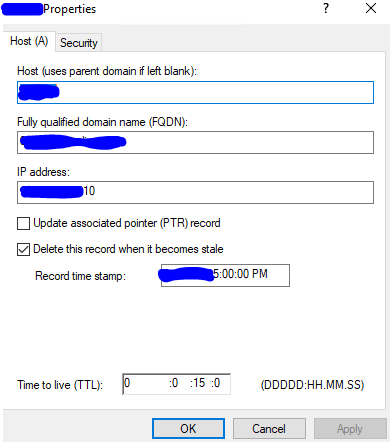
Analysis:
According to the screenshots above, we can derive at this generalization:
– No-refresh interval = 7 days
– Refresh interval = 7 days
– Scavenge stale records = enabled at [domain name] zone
– Scavenge period = not enabled at server level
Hence, the DNS server does not have a default policy to delete stale records. However, the domain zone level settings have this effect (by having a check mark next to ‘scavenge stale resource records’). Furthermore, since the record is set as ‘dynamic’, it would automatically delete itself after a refresh interval + no refresh interval or 7 + 7 = 14 days have expired.
More importantly, the DHCP server option to ‘discard A and PTR records when lease is deleted’ would also trigger an automatic deletion. Hence, any machine that has a DHCP lease would be at risk of its associated DNS records being purged if its lease doesn’t get renewed. Therefore, if a machine leases an IP, then subsequently sets that IP as static in its TCP/IP settings, would run the risk of its a-host record being pruned due to it no longer sending out DHCP renew packets to the DHCP server.
There may be other factors, such as network layer 1-3 issues preventing packets from leaving the clients or reaching the servers. In such scenarios, that would have a similar effect of the client not renewing its lease toward the DHCP servers and performing refreshes toward DNS servers. Thus, such client machines and their associated DNS records would also be cleared automatically.
