Posted On January 28, 2021

Linux: Check CPU Utilization

kimconnect 0 comments
blog.KimConnect.com >> Linux >> Linux: Check CPU Utilization

There are many utilities that would provide this information. The easiest one that is available in all major Linux distribution would the use of ‘top’ command. Here’s a sample output of: top -i (the -i argument tells top to hide all idle processes)
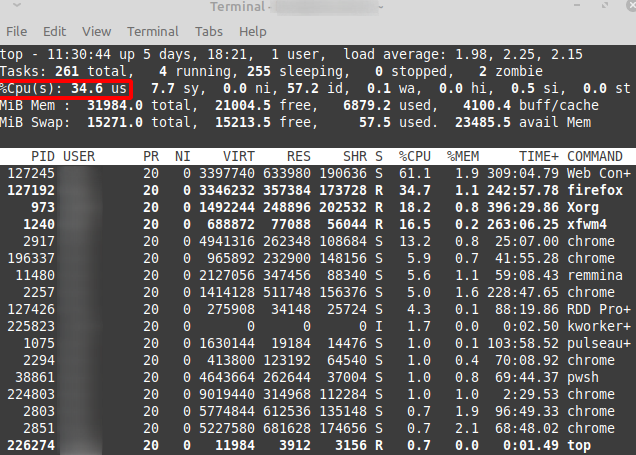
Sample output of the ‘top’ command

Leave a Reply

Your email address will not be published. Required fields are marked *

Related Post

Linux DNS Networking

DNS client on Linux: /etc/resolv.conf specifies the nameservers for resolver lookups. The order of lookup…

Kubernetes – Pausing Applications by Scaling Deployments or Stateful Sets

# Pause application kubectl scale deploy nextcloud --replicas=0 kubectl scale statefulsets nextcloud-db-postgresql --replicas=0 kubectl scale…

How To Install Rancher Onto a Kubernetes Cluster

Step 1: Add Rancher Repo into Helm Source: https:// rancher.com/docs/rancher/v2.x/en/installation/install-rancher-on-k8s/ # Add Rancher repo helm…