Posted On January 12, 2021

Linux: Creating Volume Shortcuts

kimconnect 0 comments
blog.KimConnect.com >> Linux >> Linux: Creating Volume Shortcuts

Run xfce4-keyboard-settings > select the ‘Application Shortcuts’ tab > Add > input one of the three commands below > OK

# command to increase volume
amixer set Master playback 5dB+
pactl set-sink-volume @DEFAULT_SINK@ +5%
# Command to reduce volume
amixer set Master playback 5dB-
pactl set-sink-volume @DEFAULT_SINK@ -5%
# command to toggle mute/unmute volume
amixer -D pulse set Master toggle
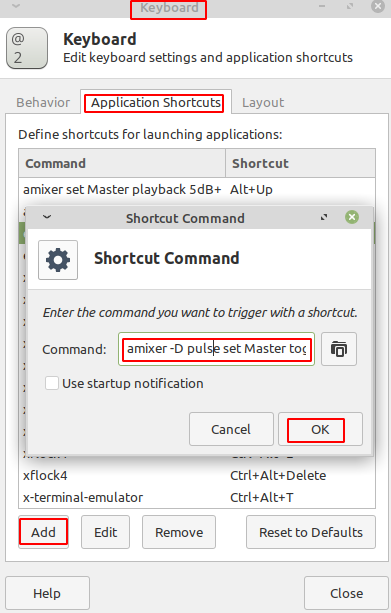
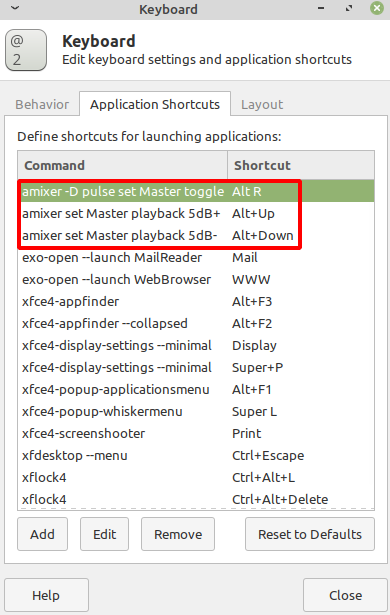
Press a key combination on the keyboard > repeat process for the next commands until completion
Leave a Reply

Your email address will not be published. Required fields are marked *

Related Post

A Few Todos while Securing Apache Server

- Install mod_security - Set expose_php = Off in php.ini - Set SecResponseBodyAccess Off in…

LAMPP: Change Apache Listening Port

Change Apache listening port:vim /opt/lampp/etc/httpd.confEdit line:Listen 80 (change to 8888)OPEN port 8888:vim /etc/sysconfig/iptables-A RH-Firewall-1-INPUT -m…

How To Install X11VNC on Ubuntu

# Note: this setup is the quick and dirty method for lab environments # Secured…
