Posted On September 25, 2020

Microsoft Dynamics Audit History Data Missing After Org Migration

kimconnect 0 comments
blog.KimConnect.com >> Database >> Microsoft Dynamics Audit History Data Missing After Org Migration
Issue:

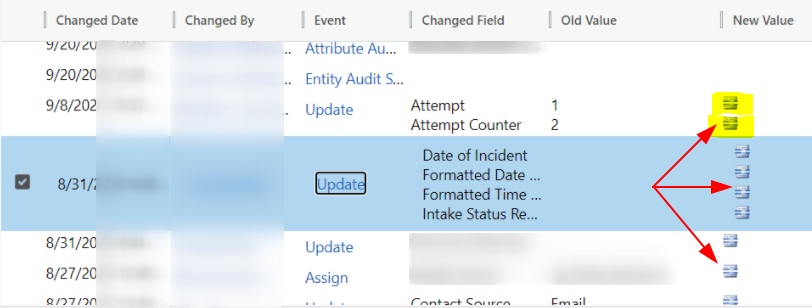
We have recently moved some Orgs from CRM version 8.x to 9.x, and audit history of some intakes shows data as just these container icons
Resolution:

It appears that the upgrading process somehow has generated the Audit Change ([Action] = 102) at Case Entity Level (ObjectTypeCode 112) as Disabled Events (ChangeData = True). Therefore, the recommended action would be:

  1. Make a full backup of the DB prior to any changes!
  2. Run this TSQL command against the DB
    USE DatabaseName_MSCRM -- fill in the correct database name here
    GO
    DELETE FROM [dbo].[AuditBase]
    WHERE
    Action = 102 AND -- Audit Change at Entity Level
    ChangeData = 'True' AND -- For Disabled Events
    (ObjectTypeCode = 112 OR ObjectTypeCode = 2) -- Case OR Contact Entity Object Type Codes
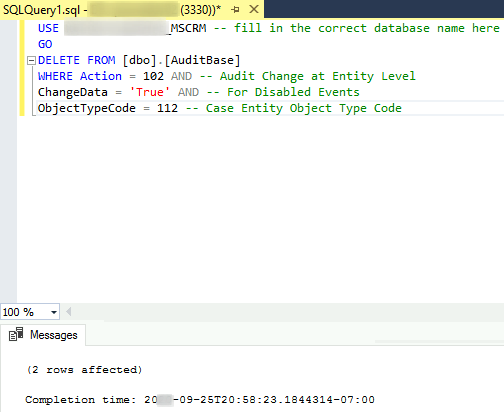
    Sample Output:
  3. Refresh the case records via the CRM UI to verify that new values have been generated in the Audit History query.


Leave a Reply

Your email address will not be published. Required fields are marked *

Related Post

PowerShell: Backup, Archive, and Remove a Microsoft SQL Database

$sqlServer='sqlsherver007' $databaseName="someDatabaseName" $saCredential=get-credential $backupDestination="\\Archive03\MSSQL_Backups" function triggerSqlBackup($sqlServer,$databaseName){ # Ensure the the Jump Box has SQL PowerShell…

SQL Admin

How to Trace Deadlocks:SQL Management Studio >> Tools >> SQL Profiler >> log in >>…

PowerShell: Restore SQL Database from Full and/or Differential Backups

$databaseName='BALOO_MSCRM' $newDatabaseName='BALOO_MSCRM' $dbData='mscrm' # set this value to $null for autogen defaults $dbLog='mscrm_log' # set…
