PowerShell snippet to initiate repair
# set user alias or email addresses here:
$userAliases="user1","user2"

foreach ($user in $userAliases){
	New-MailboxRepairRequest -Mailbox $user -CorruptionType ProvisionedFolder,SearchFolder,AggregateCounts,Folderview
}
PowerShell command to monitor progress:
# This command doesn't work
# Get-MailboxRepairRequest -Mailbox $userAlias | Format-List
Use Event Viewer to monitor progress:
Eventvwr.exe > Action > Create Custom View > select “By Source > select “MSExchangeIS Mailbox Store” > Event IDs = 10044,10045,01146,10047,10048,10049,10050,10051,10059,10062 > OK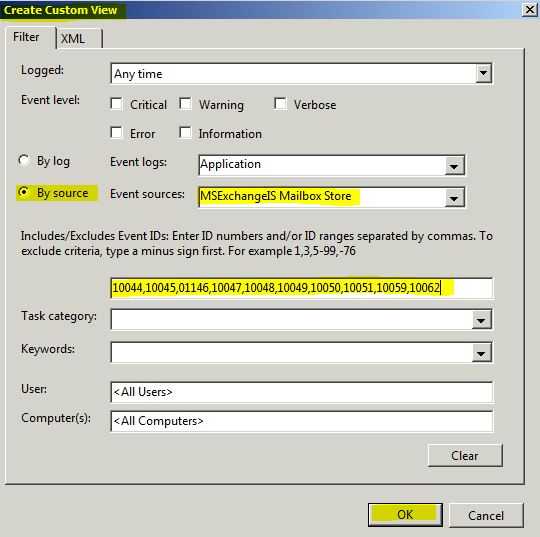
Give this Custom View a name such as “Get-MailboxRepairRequest” > OK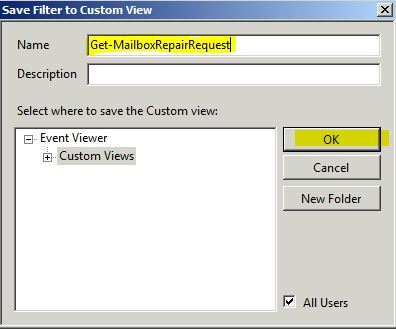
Navigate to Event Viewer > Custom Views > click on Get-MailboxRepairRequest > check for Event ID 10048 to signify a successful completion of a mailbox repair job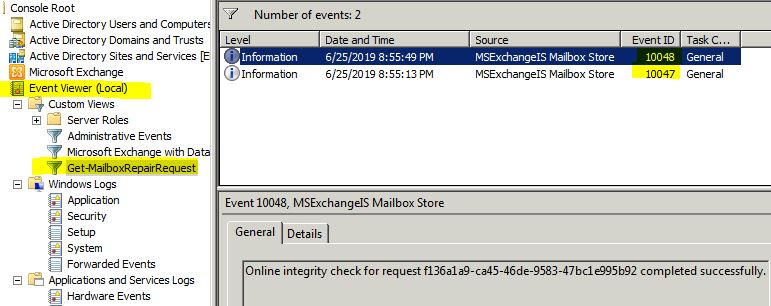
Events IDs:
- 10047 A mailbox-level repair request started
- 10064 A Public Folder repair request started
- 10048 The repair request successfully completed
- 10050 The mailbox repair request task skipped a mailbox
- 10059 A database-level repair request started
- 10062 Corruption was detected
Categories:
