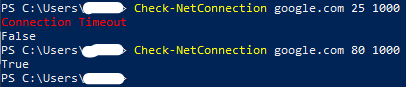
This little snippet is useful as a helper function to quickly determine port connectivity between different nodes. Although the included Test-NetConnection of PowerShell version 5+ already serves this purpose, this legacy method includes the feature to control timeouts so that it is faster to return results. Moreover, only one connection is made to assess active targets, whereas the newer Test-NetConnection makes two contacts to determine live nodes. In short, System.Net.Sockets.TcpClient (a function from the DotNet 3+ library) is more efficient and could be used in lieu of the PowerShell standard command.
function Check-NetConnection($computername,$port,$timeout=200,$verbose=$false) {
            $tcp = New-Object System.Net.Sockets.TcpClient;
            try {
                $connect=$tcp.BeginConnect($computername,$port,$null,$null)
                $wait = $connect.AsyncWaitHandle.WaitOne($timeout,$false)
                if(!$wait){
                    $null=$tcp.EndConnect($connect)
                    $tcp.Close()
                    if($verbose){
                        Write-Host "Connection Timeout" -ForegroundColor Red
                        }
                    Return $false
                }else{
                    $error.Clear()
                    $null=$tcp.EndConnect($connect) # Dispose of the connection to release memory
                    if(!$?){
                        if($verbose){
                            write-host $error[0].Exception.Message -ForegroundColor Red
                            }
                        $tcp.Close()
                        return $false
                        }
                    $tcp.Close()
                    Return $true
                }
            } catch {
                return $false
            }
    }
Categories:
