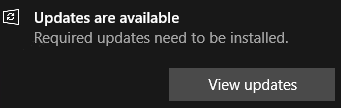
This little snippet would render these notices as void.

# This snippet is to add the deny execute permissions to the pop-up executables
# Windows Updates wuapp.exe (GUI) & PSWindowsUpdate (PS Module) are unaffected. To reverse, simply remove the added ACL

$system32="$env:windir\System32"
$annoyingNotifications="$system32\musnotification.exe","$system32\musnotificationux.exe"
$denyExecute= New-Object System.Security.AccessControl.FileSystemAccessRule("Everyone","Execute","Deny")
$annoyingNotifications|%{
    takeown /f $_;
if (test-path $_){
$acl = Get-ACL $_
    $acl.AddAccessRule($denyExecute)
    Set-Acl $_ $acl
}
    }
# Legacy method: start an elevated command prompt and enter these commands:

cmd.exe
cd /d "%windir%\System32"
takeown /f musnotification.exe
icacls musnotification.exe /deny Everyone:(X)
takeown /f musnotificationux.exe
icacls musnotificationux.exe /deny Everyone:(X)
# This snippet to reverse the effects of the previous function

cd /d "%Windir%\System32"
icacls musnotification.exe /remove:d Everyone
icacls musnotification.exe /grant Everyone:F
icacls musnotification.exe /setowner "NT SERVICE\TrustedInstaller"
icacls musnotification.exe /remove:g Everyone
icacls musnotificationux.exe /remove:d Everyone
icacls musnotificationux.exe /grant Everyone:F
icacls musnotificationux.exe /setowner "NT SERVICE\TrustedInstaller"
icacls musnotificationux.exe /remove:g Everyone
Categories:
