# setProcessNameToCpuNumber.ps1

$computerName =$env:computername
$processname="Chrome";

function getProcessors{
    param(
        $computerName=$env:computername
        )
    [int]$processors = 0;
    $cpuObject = Get-WmiObject -computername $computerName win32_processor -ea stop
    $cpuObject | % { $processors += $_.NumberOfLogicalProcessors};
    #$cpuObject | select Name,NumberOfCores,LoadPercentage
    return $processors;
}

function setCpuAffinity {
    param (
    [string]$computerName=$env:computername,
    [string]$processName,
    [int[]]$coreNumbers,
    [switch]$all
    )

    <# Implementation of Processor bitmask calculation
    Core # => BitMask => decimal representation
    Core 1 => 00000001 => 1
    Core 2 => 00000010 => 2
    Core 3 => 00000100 => 4
    Core 4 => 00001000 => 8
    Core 5 => 00010000 => 16
    Core 6 => 00100000 => 32
    Core 7 => 01000000 => 64
    Core 8 => 10000000 => 128
    ==========================
    8 Cores => 11111111 => 255
    4 Cores => 00001111 => 15
    2 Cores => 00000011 => 3
    #>
    [int]$processors = 0;
    $cpuObject = Get-WmiObject -computername $computerName win32_processor -ea stop
    $cpuObject | % { $processors += $_.NumberOfLogicalProcessors};
    $maxAffinityValue = ([math]::pow(2,$processors)-1);

    [int]$affinityValue = 0;
    if ($all) {
        $affinityValue = $maxAffinityValue
        }else{
        $coreNumbers | select -unique |  %  {$affinityValue += [math]::pow(2,$_-1) }
        }
    if (($affinityValue -gt $maxAffinityValue) -or ($affinityValue -lt 1)) {$affinityValue = $maxAffinityValue}

    function convertAffinityValueToCpuNumbers([int]$value){
        $cpuNumbers=@()

        $bitmask=[Convert]::ToString($value,2)

        $reversedBitmask=ForEach ($character in $bitmask) {
            ([regex]::Matches($character,'.','RightToLeft') | ForEach {$_.value}) -join ''
        }

        for ($i=0;$i -lt $reversedBitmask.length;$i++){
            [int]$x=$reversedBitmask[$i].ToString();
            if ($x -eq 1){
                $cpuNumbers+=,$($i+1)
                }
            }
        $result=$cpuNumbers -join ","
        return $result
        }

    $processMatches=Get-Process -name $processName -ComputerName $computerName
    if($processMatches){
        invoke-command -ComputerName $computerName -ScriptBlock {
            param($processName,$affinityValue)
            Get-Process -name $processName|%{ $_.ProcessorAffinity = $affinityValue };
            } -Args $processName,$affinityValue
         $resultAffinityValue=(Get-Process -name $processName -ComputerName $computerName).ProcessorAffinity|select -Unique;
         $validation=convertAffinityValueToCpuNumbers $resultAffinityValue
         return "Process $processName has been set and validated to CPU affinity of $validation"
        }else{
            write-host "Process name $processName doesn't match anything on $computername.";
            return $false;
            }
}

write-host "There are $(getProcessors) logical CPUs on $computerName."
setCpuAffinity -computerName $computerName -processName $processname -coreNumbers 1,2,3,4
Sample Output:
PS C:\Windows\system32> write-host "there are logical $(getProcessors) on $computerName."
There are 4 logical CPUs on GRANDPA-LAPTOP.
PS C:\Windows\system32> setCpuAffinity -computerName $computerName -processName $processname -coreNumbers 1,4
Process Chrome has been set and validated to CPU affinity of 1,4
Evidence of CPUs 1 &4 being taxed heavily after the change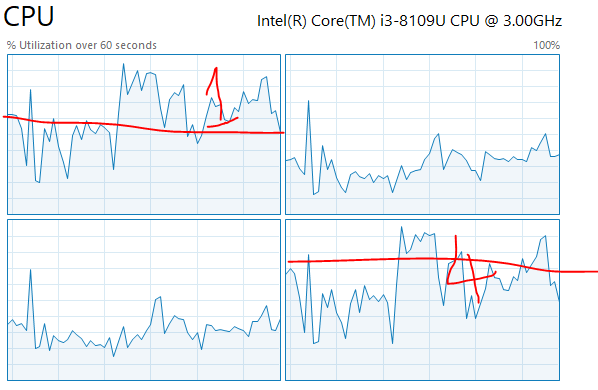
Categories:
