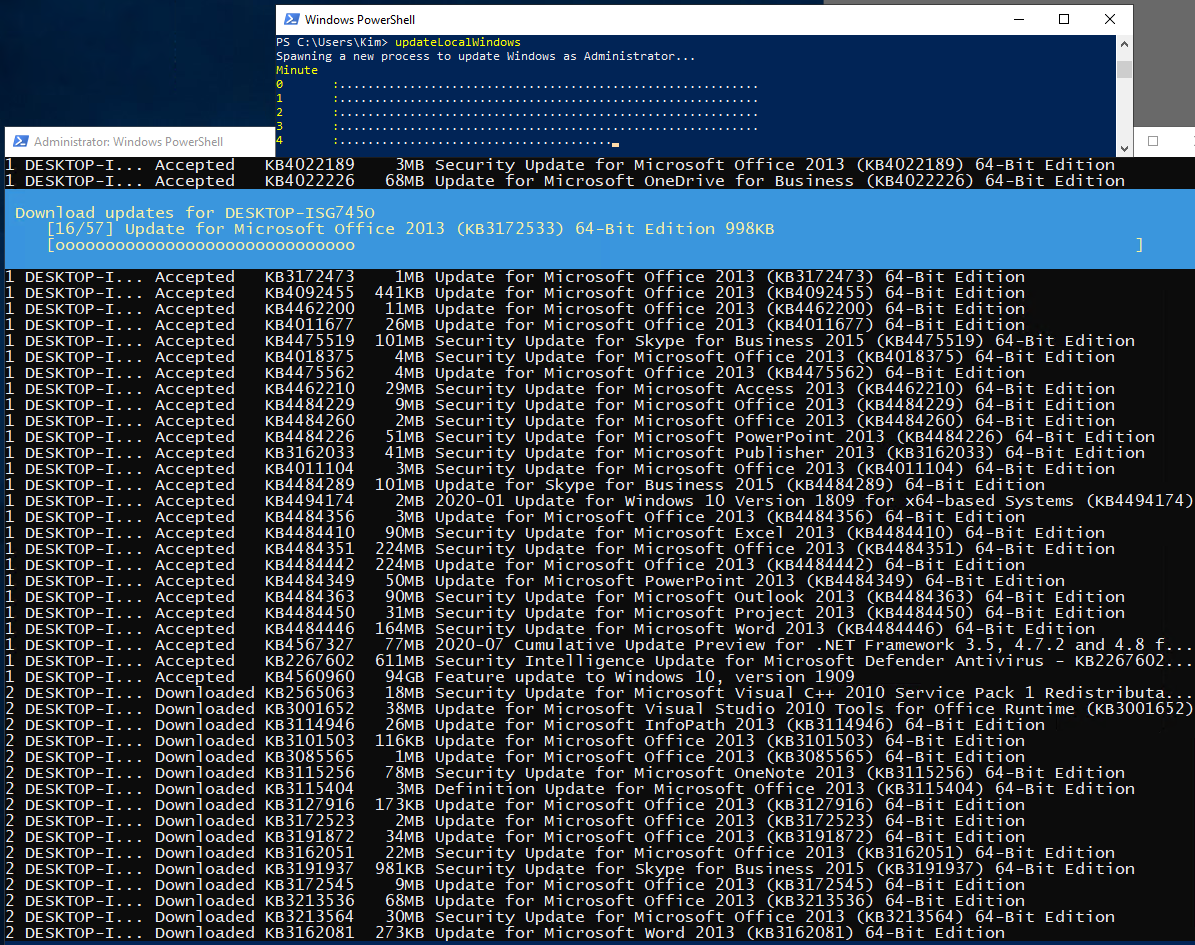
This script is meant to be ran on a local computer. To update remote machines, use this script here.
# updateLocalWindows_v0.0.5.ps1
# This function will quickly patch the local Windows machine
# There are two options:
#- Windows Update: will only patch the Windows Operating System
#- Microsoft Update (default): will patch all Microsoft products detected on the system
#- This version will ONLY work when running as Session 0 or console. It's NOT intended to be invoked as a WinRM session.
#
# Usage:
# 1. updatelocalWindows
# 2. updateLocalWindows -verbose $false
# 3. updateLocalWindows -microsoftUpdate $false
# 4. updateLocalWindows -microsoftUpdate $false -verbose $false
# 5. updateLocalWindows -microsoftUpdate $true -notCategory 'Drivers'

function updateLocalWindows($microsoftUpdates=$true,$verbose=$false,$notCategory='Drivers'){
  if($verbose){$localTimer=[System.Diagnostics.Stopwatch]::StartNew()}
  $tempDir='C:\temp\'
  if(Test-Path $tempDir){$null=mkdir $tempDir -force}
  if(!(test-WsMan $env:computername)){winrm quickconfig}
  function checkPendingReboot{
          function checkRegistryPendingReboot{
                  if (Get-ChildItem 'HKLM:\Software\Microsoft\Windows\CurrentVersion\Component Based Servicing\RebootPending' -EA Ignore) { return $true }
                  if (Get-Item 'HKLM:\SOFTWARE\Microsoft\Windows\CurrentVersion\WindowsUpdate\Auto Update\RebootRequired' -EA Ignore) { return $true }
                  if (Get-ItemProperty 'HKLM:\SYSTEM\CurrentControlSet\Control\Session Manager' -Name PendingFileRenameOperations -EA Ignore) { return $true }
                  try {
                  $util = [wmiclass]'\\.\root\ccm\clientsdk:CCM_ClientUtilities'
                  $status = $util.DetermineIfRebootPending()
                  if(($status -ne $null) -and $status.RebootPending){
                      return $true
                  }
                  }catch{}
                  return $false
          }
          return checkRegistryPendingReboot
      }

  function updateWindows($microsoftUpdates,$notCategory){
      #Install the PowerShell Windows Update module
      $checkModule=Get-Module -ListAvailable -Name PSWindowsUpdate
      if(!($checkModule)){
          [Net.ServicePointManager]::SecurityProtocol = [Net.SecurityProtocolType]::Tls12
          $nugetInstalled=Get-PackageProvider nuget -EA Ignore
          if(!$nugetInstalled){Install-PackageProvider -Name Nuget -RequiredVersion 2.8.5.201 -Force}
          $trustPSGallery=(Get-psrepository -Name 'PSGallery').InstallationPolicy
          If($trustPSGallery -ne 'Trusted'){
              Set-PSRepository -Name 'PSGallery' -InstallationPolicy Trusted
              }
          Install-Module PSWindowsUpdate -Confirm:$false
          }

      # Perform Updates
      set-executionpolicy bypass -force
      if($bypassWsus){
          }
      # -MicrosoftUpdate: include other Microsoft products (Office, Silverlight, Visual C++, etc.)
      # -WindowsUpdate: include only Windows updates
      if($microsoftUpdates){
          # Register Microsoft Update Service if it has not been registered
          $microsoftUpdateId='7971f918-a847-4430-9279-4a52d1efe18d'
          if (!($microsoftUpdateId -in (Get-WUServiceManager).ServiceID)){
              Add-WUServiceManager -ServiceID $microsoftUpdateId -Confirm:$false
              }
          $updateCommand='Get-WindowsUpdate -AcceptAll -MicrosoftUpdate -Install -IgnoreReboot'+$(if($notCategory){' -NotCategory '+$notCategory})
      }else{
          $updateCommand='Get-WindowsUpdate -AcceptAll -WindowsUpdate -Install -IgnoreReboot'+$(if($notCategory){' -NotCategory '+$notCategory})
      }
      Invoke-Expression $updateCommand
      $pendingReboot=checkPendingReboot $computer
      if(!$pendingReboot){
          write-host 'No pending reboots detected.' -ForegroundColor Green
      }else{
          write-host 'Pending reboots detected.' -ForegroundColor Yellow
          }
      }

  function checkUpdates($microsoftUpdates,$notCategory='drivers',$verbose=$false){
      ## This runs into the constraints of unelevated process being prevented from reading stdout of an elevated session
      ## Source: https:// docs.microsoft.com/en-us/dotnet/api/system.diagnostics.process?view=netcore-3.1
      #$startInfo = New-Object System.Diagnostics.ProcessStartInfo
      #$startInfo.FileName = $exe
      #$startInfo.RedirectStandardError = $true
      #$startInfo.RedirectStandardOutput = $true
      #$startInfo.Arguments = "(Get-wulist -verbose).kb.count"
      #$startInfo.CreateNoWindow = $false
      #$startInfo.UseShellExecute = $false
      ##$startInfo.Verb = "runas"
      ##$startInfo.UseShellExecute = $true
      ##Error when trying to run as Administrator: Exception calling 'Start' with "0" argument(s):
      ## 'The Process object must have the UseShellExecute property set to false in order to redirect IO streams.'
      #$process = New-Object System.Diagnostics.Process
      #$process.StartInfo = $startInfo
      #$process.Start()
      #$process.WaitForExit()
      #$stdout = $process.StandardOutput.ReadToEnd()
      #$stderr = $process.StandardError.ReadToEnd()
      #Write-Host 'stdout: '+ $stdout
      #if($stderr){Write-Host 'stderr: '+$stderr -ForegroundColor Red}
      #Write-Host 'exit code: '+$($process.ExitCode)
      #return $stdout

      # This is the workaround
      $tempFile='C:\temp\availableUpdatesCount.txt'
      $checkUpdates=@"
          `$x=(Get-wulist -verbose $(if($microsoftUpdates){'-MicrosoftUpdate '}) $(if($notCategory){'-NotCategory '+$notCategory})).kb.count
          write-host `$x
          New-Item '$tempFile' -ItemType File -Value `$x -Force
"@
      Start-Process -verb Runas powershell.exe $checkUpdates -Wait -WindowStyle $(if($verbose){'normal'}else{'minimized'})
      $result=Get-Content $tempFile
      Start-Process -verb Runas powershell.exe "remove-item '$tempFile' -Force" -WindowStyle hidden -Wait
      return $result
  }

  $Host.UI.RawUI.BackgroundColor = 'Black'
  $myWindowsID=[System.Security.Principal.WindowsIdentity]::GetCurrent()
  $myWindowsPrincipal=new-object System.Security.Principal.WindowsPrincipal($myWindowsID)
  $adminRole=[System.Security.Principal.WindowsBuiltInRole]::Administrator
  if ($myWindowsPrincipal.IsInRole($adminRole)){
      write-host "This session is running under the context of the system 'Administrator'" -ForegroundColor Green
  }else{
      write-warning "This session is NOT in the context of 'Administrator'"
      }

    updateWindows $microsoftUpdates $notCategory
    [bool]$isPendingReboot=checkPendingReboot
    [int]$updatesAvailable=checkUpdates $microsoftUpdates $notCategory $verbose
    if(!$isPendingReboot -and !$updatesAvailable){
        write-host "`r`nWindows updates completed" -ForegroundColor Green
        $completed=$true
    }else{
        if($isPendingReboot){write-host "`r`nPending reboots detected." -ForegroundColor Yellow}
        if($updatesAvailable){write-host "`r`nMissing $updatesAvailable updates." -ForegroundColor Yellow}
        $completed=$false
        }
  if($verbose){
      $minutes=[math]::round($localTimer.Elapsed.TotalMinutes,2)
      write-host "$minutes minutes elapsed"
  }
  return $completed
}

updateLocalWindows
# updateLocalWindows_v0.0.4.ps1
# This function will quickly patch the local Windows machine
# There are two options:
#- Windows Update: will only patch the Windows Operating System
#- Microsoft Update (default): will patch all Microsoft products detected on the system
#- This version will ONLY works when running as Session 0 or console. It's NOT intended to be invoked as a WinRM session.
#
# Usage:
# 1. updatelocalWindows
# 2. updateLocalWindows -verbose $false
# 3. updateLocalWindows -microsoftUpdate $false
# 4. updateLocalWindows -microsoftUpdate $false -verbose $false
# 5. updateLocalWindows -microsoftUpdate $true -notCategory 'Drivers'

function updateLocalWindows($microsoftUpdates=$true,$verbose=$false,$notCategory='Drivers'){
  if($verbose){$localTimer=[System.Diagnostics.Stopwatch]::StartNew()}
  $tempDir='C:\temp\'
  if(Test-Path $tempDir){$null=mkdir $tempDir -force}

if(!(test-WsMan $env:computername)){winrm quickconfig}

  function checkPendingReboot{
          function checkRegistryPendingReboot{
                  if (Get-ChildItem 'HKLM:\Software\Microsoft\Windows\CurrentVersion\Component Based Servicing\RebootPending' -EA Ignore) { return $true }
                  if (Get-Item 'HKLM:\SOFTWARE\Microsoft\Windows\CurrentVersion\WindowsUpdate\Auto Update\RebootRequired' -EA Ignore) { return $true }
                  if (Get-ItemProperty 'HKLM:\SYSTEM\CurrentControlSet\Control\Session Manager' -Name PendingFileRenameOperations -EA Ignore) { return $true }
                  try {
                  $util = [wmiclass]'\\.\root\ccm\clientsdk:CCM_ClientUtilities'
                  $status = $util.DetermineIfRebootPending()
                  if(($status -ne $null) -and $status.RebootPending){
                      return $true
                  }
                  }catch{}
                  return $false
          }
          return checkRegistryPendingReboot
      }

  function updateWindows($microsoftUpdates,$notCategory){
      #Install the PowerShell Windows Update module
      $checkModule=Get-Module -ListAvailable -Name PSWindowsUpdate
      if(!($checkModule)){
          [Net.ServicePointManager]::SecurityProtocol = [Net.SecurityProtocolType]::Tls12
          $nugetInstalled=Get-PackageProvider nuget
          if(!$nugetInstalled){Install-PackageProvider -Name Nuget -RequiredVersion 2.8.5.201 -Force -confirm:$false}
          $trustPSGallery=(Get-psrepository -Name 'PSGallery').InstallationPolicy
          If($trustPSGallery -ne 'Trusted'){
              Set-PSRepository -Name 'PSGallery' -InstallationPolicy Trusted
              }
          Install-Module PSWindowsUpdate -Confirm:$false
          }

      # Perform Updates
      set-executionpolicy bypass -force
      if($bypassWsus){
          }
      # -MicrosoftUpdate: include other Microsoft products (Office, Silverlight, Visual C++, etc.)
      # -WindowsUpdate: include only Windows updates
      if($microsoftUpdates){
          # Register Microsoft Update Service if it has not been registered
          $microsoftUpdateId='7971f918-a847-4430-9279-4a52d1efe18d'
          if (!($microsoftUpdateId -in (Get-WUServiceManager).ServiceID)){
              Add-WUServiceManager -ServiceID $microsoftUpdateId -Confirm:$false
              }
          $updateCommand='Get-WindowsUpdate -AcceptAll -MicrosoftUpdate -Install -IgnoreReboot'+$(if($notCategory){' -NotCategory '+$notCategory})
      }else{
          $updateCommand='Get-WindowsUpdate -AcceptAll -WindowsUpdate -Install -IgnoreReboot'+$(if($notCategory){' -NotCategory '+$notCategory})
      }
      Invoke-Expression $updateCommand

      $pendingReboot=checkPendingReboot $computer
      if(!$pendingReboot){
          write-host 'Updates are completed.' -ForegroundColor Green
          return $true
      }else{
          write-host 'Please reboot and trigger updates again to complete the process.' -ForegroundColor Yellow
          return $false
          }
      }

  function checkUpdates($microsoftUpdates,$notCategory='drivers',$verbose=$false){
      ## This runs into the constraints of unelevated process being prevented from reading stdout of an elevated session
      ## Source: https:// docs.microsoft.com/en-us/dotnet/api/system.diagnostics.process?view=netcore-3.1
      #$startInfo = New-Object System.Diagnostics.ProcessStartInfo
      #$startInfo.FileName = $exe
      #$startInfo.RedirectStandardError = $true
      #$startInfo.RedirectStandardOutput = $true
      #$startInfo.Arguments = "(Get-wulist -verbose).kb.count"
      #$startInfo.CreateNoWindow = $false
      #$startInfo.UseShellExecute = $false
      ##$startInfo.Verb = "runas"
      ##$startInfo.UseShellExecute = $true
      ##Error when trying to run as Administrator: Exception calling 'Start' with "0" argument(s):
      ## 'The Process object must have the UseShellExecute property set to false in order to redirect IO streams.'
      #$process = New-Object System.Diagnostics.Process
      #$process.StartInfo = $startInfo
      #$process.Start()
      #$process.WaitForExit()
      #$stdout = $process.StandardOutput.ReadToEnd()
      #$stderr = $process.StandardError.ReadToEnd()
      #Write-Host 'stdout: '+ $stdout
      #if($stderr){Write-Host 'stderr: '+$stderr -ForegroundColor Red}
      #Write-Host 'exit code: '+$($process.ExitCode)
      #return $stdout

      # This is the workaround
      $tempFile='C:\temp\availableUpdatesCount.txt'
      $checkUpdates=@"
          `$x=(Get-wulist -verbose $(if($microsoftUpdates){'-MicrosoftUpdate '}) $(if($notCategory){'-NotCategory '+$notCategory})).kb.count
          write-host `$x
          New-Item '$tempFile' -ItemType File -Value `$x -Force
"@
      Start-Process -verb Runas powershell.exe $checkUpdates -Wait -WindowStyle $(if($verbose){'normal'}else{'minimized'})
      $result=Get-Content $tempFile
      Start-Process -verb Runas powershell.exe "remove-item '$tempFile' -Force" -WindowStyle hidden -Wait
      return $result
  }

  $functionScript = @"
      `$Host.UI.RawUI.BackgroundColor = 'Black'
      `$myWindowsID=[System.Security.Principal.WindowsIdentity]::GetCurrent()
      `$myWindowsPrincipal=new-object System.Security.Principal.WindowsPrincipal(`$myWindowsID)
      `$adminRole=[System.Security.Principal.WindowsBuiltInRole]::Administrator
      if (`$myWindowsPrincipal.IsInRole(`$adminRole)){
          write-host "This session is running under the context of the system 'Administrator'" -ForegroundColor Green
      }else{
          write-warning "This session is NOT in the context of 'Administrator'"
          }
      Function checkPendingReboot{
          $(Get-Command checkPendingReboot|Select -expand Definition)
      }
      Function updateWindows{
          $(Get-Command updateWindows|Select -expand Definition)
      }
      updateWindows $microsoftUpdates $notCategory
"@

  write-host "Spawning a background process to update Windows as Administrator..."
  do{
      $process=Start-Process -verb Runas powershell $functionScript -WindowStyle $(if($verbose){'normal'}else{'minimized'}) -PassThru
      $lineBreak=60
      $dotCount=0
      $minute=0
      write-host "Minute`r`n$minute`t:" -NoNewline -ForegroundColor Yellow
      do {
          if($dotCount++ -lt $lineBreak){
              write-host '.' -NoNewline
          }else{
              $minute++
              write-host "`r`n$minute`t:" -ForegroundColor Yellow -NoNewline
              $dotCount=0
              }
          Start-Sleep -s 1
      }until (!$process.Responding)

      [bool]$isPendingReboot=checkPendingReboot
      [int]$updatesAvailable=checkUpdates $microsoftUpdates $notCategory $verbose
      if(!$isPendingReboot -and !$updatesAvailable){
          write-host "`r`nWindows updates completed" -ForegroundColor Green
          $completed=$true
      }else{
          if($isPendingReboot){write-host "`r`nPending reboots detected." -ForegroundColor Yellow}
          if($updatesAvailable){write-host "`r`nMissing $updatesAvailable updates." -ForegroundColor Yellow}
          $completed=$false
          }
  }until(!$updatesAvailable -or $isPendingReboot)

  if($verbose){
      $minutes=[math]::round($localTimer.Elapsed.TotalMinutes,2)
      write-host "$minutes minutes elapsed"
  }
  return $completed
}

updateLocalWindows
# updateLocalWindows_v0.0.5.ps1
# Note: broken

function updateLocalWindows{
    param(
        $microsoftUpdates=$false, # Setting this to True also means WSUS shall be bypassed
        $notCategory='Drivers',
        $verbose=$false
    )
    if($verbose){$localTimer=[System.Diagnostics.Stopwatch]::StartNew()}

    function checkPendingReboot{
        function checkRegistry{
            if (Get-ChildItem "HKLM:\Software\Microsoft\Windows\CurrentVersion\Component Based Servicing\RebootPending" -EA Ignore) { return $true }
            if (Get-ChildItem "HKLM:\Software\Microsoft\Windows\CurrentVersion\Component Based Servicing\RebootInProgress" -EA Ignore) { return $true }
            if (Get-Item "HKLM:\SOFTWARE\Microsoft\Windows\CurrentVersion\WindowsUpdate\Auto Update\RebootRequired" -EA Ignore) { return $true }
            if (Get-Item "HKLM:\Software\Microsoft\Windows\CurrentVersion\Component Based Servicing\PackagesPending" -EA Ignore) { return $true }
            if (Get-Item "HKLM:\SOFTWARE\Microsoft\Windows\CurrentVersion\WindowsUpdate\Auto Update\PostRebootReporting" -EA Ignore) { return $true }
            if (Get-ItemProperty "HKLM:\SYSTEM\CurrentControlSet\Control\Session Manager" -Name PendingFileRenameOperations -EA Ignore) { return $true }
            if (Get-ItemProperty "HKLM:\SYSTEM\CurrentControlSet\Control\Session Manager" -Name PendingFileRenameOperations2 -EA Ignore) { return $true }
            try{
                $util = [wmiclass]"\\.\root\ccm\clientsdk:CCM_ClientUtilities"
                $status = $util.DetermineIfRebootPending()
                if(($null -ne $status) -and $status.RebootPending){
                    $result.SCCMRebootPending = $true
                }
            }catch{
                return $false
            }
        }
        return checkRegistry
    }

    function updateWindows($microsoftUpdates,$notCategory){
        #Install the PowerShell Windows Update module
        $checkModule=Get-Module -ListAvailable -Name PSWindowsUpdate
        if(!($checkModule)){
            [Net.ServicePointManager]::SecurityProtocol = [Net.SecurityProtocolType]::Tls12
            # Set PowerShell Gallery as Trusted to bypass prompts
            #$trustPSGallery=(Get-psrepository -Name 'PSGallery').InstallationPolicy
            If($trustPSGallery -ne 'Trusted'){
                Install-PackageProvider -Name Nuget -Force
                #Set-PSRepository -Name 'PSGallery' -InstallationPolicy Trusted
                }
            Install-Module PSWindowsUpdate -Confirm:$false
            }

        # Perform Updates
        set-executionpolicy bypass -force
        # -MicrosoftUpdate: include other Microsoft products (Office, Silverlight, Visual C++, etc.)
        # -WindowsUpdate: include only Windows updates
        if($microsoftUpdates){
            # Register Microsoft Update Service if it has not been registered
            $microsoftUpdateId='7971f918-a847-4430-9279-4a52d1efe18d'
            if (!($microsoftUpdateId -in (Get-WUServiceManager).ServiceID)){
                Add-WUServiceManager -ServiceID $microsoftUpdateId -Confirm:$false
                }
            $updateCommand='Get-WindowsUpdate -AcceptAll -MicrosoftUpdate -Install -IgnoreReboot'+$(if($notCategory){' -NotCategory '+$notCategory})
        }else{
            $updateCommand='Get-WindowsUpdate -AcceptAll -Install -IgnoreReboot'+$(if($notCategory){' -NotCategory '+$notCategory})
        }
        Invoke-Expression $updateCommand

        $pendingReboot=checkPendingReboot $computer
        if(!$pendingReboot){
            write-host 'Updates are completed.' -ForegroundColor Green
            return $true
        }else{
            write-host 'Please reboot and trigger updates again to complete the process.' -ForegroundColor Yellow
            return $false
            }
        }

    function checkUpdates($microsoftUpdates,$notCategory='drivers',$verbose=$false){
        ## This runs into the constraints of unelevated process being prevented from reading stdout of an elevated session
        ## Source: https:// docs.microsoft.com/en-us/dotnet/api/system.diagnostics.process?view=netcore-3.1
        #$startInfo = New-Object System.Diagnostics.ProcessStartInfo
        #$startInfo.FileName = $exe
        #$startInfo.RedirectStandardError = $true
        #$startInfo.RedirectStandardOutput = $true
        #$startInfo.Arguments = "(Get-wulist -verbose).kb.count"
        #$startInfo.CreateNoWindow = $false
        #$startInfo.UseShellExecute = $false
        ##$startInfo.Verb = "runas"
        ##$startInfo.UseShellExecute = $true
        ##Error when trying to run as Administrator: Exception calling 'Start' with "0" argument(s):
        ## 'The Process object must have the UseShellExecute property set to false in order to redirect IO streams.'
        #$process = New-Object System.Diagnostics.Process
        #$process.StartInfo = $startInfo
        #$process.Start()
        #$process.WaitForExit()
        #$stdout = $process.StandardOutput.ReadToEnd()
        #$stderr = $process.StandardError.ReadToEnd()
        #Write-Host 'stdout: '+ $stdout
        #if($stderr){Write-Host 'stderr: '+$stderr -ForegroundColor Red}
        #Write-Host 'exit code: '+$($process.ExitCode)
        #return $stdout
        #
        # This is the workaround
        $tempDir='C:\temp\'
        if(Test-Path $tempDir){$null=mkdir $tempDir -force}
        $tempFile='C:\temp\availableUpdatesCount.txt'
        $checkUpdates=@"
            `$x=(Get-wulist -verbose $(if($microsoftUpdates){'-MicrosoftUpdate '}) $(if($notCategory){'-NotCategory '+$notCategory})).kb.count
            write-host `$x
            New-Item '$tempFile' -ItemType File -Value `$x -Force
"@
        Start-Process -verb Runas powershell.exe $checkUpdates -Wait -WindowStyle $(if($verbose){'normal'}else{'minimized'})
        $result=Get-Content $tempFile
        Start-Process -verb Runas powershell.exe "remove-item '$tempFile' -Force" -WindowStyle hidden -Wait
        return $result
    }

    $functionScript = @"
        `$Host.UI.RawUI.BackgroundColor = 'Black'
        `$myWindowsID=[System.Security.Principal.WindowsIdentity]::GetCurrent()
        `$myWindowsPrincipal=new-object System.Security.Principal.WindowsPrincipal(`$myWindowsID)
        `$adminRole=[System.Security.Principal.WindowsBuiltInRole]::Administrator
        if (`$myWindowsPrincipal.IsInRole(`$adminRole)){
            write-host "This session is running under the context of the system 'Administrator'" -ForegroundColor Green
        }else{
            write-warning "This session is NOT in the context of 'Administrator'"
            }
        Function checkPendingReboot{
            $(Get-Command checkPendingReboot|Select -expand Definition)
        }
        Function updateWindows{
            $(Get-Command updateWindows|Select -expand Definition)
        }
        updateWindows $microsoftUpdates $notCategory
"@

    write-host "Spawning a background process to update Windows as Administrator..."
    do{
        $process=Start-Process -verb Runas powershell $functionScript -WindowStyle $(if($verbose){'normal'}else{'minimized'}) -PassThru
        $lineBreak=60
        $dotCount=0
        $minute=0
        write-host "Minute`r`n$minute`t:" -NoNewline -ForegroundColor Yellow
        do {
            if($dotCount++ -lt $lineBreak){
                write-host '.' -NoNewline
            }else{
                $minute++
                write-host "`r`n$minute`t:" -ForegroundColor Yellow -NoNewline
                $dotCount=0
                }
            Start-Sleep -s 1
        }until (!$process.Responding)

        [bool]$isPendingReboot=checkPendingReboot
        [int]$updatesAvailable=checkUpdates $microsoftUpdates $notCategory $verbose
        if(!$updatesAvailable){
            write-host "`r`nWindows updates completed" -ForegroundColor Green
            $completed=$true
        }else{
            write-host "`r`nMissing $updatesAvailable updates." -ForegroundColor Yellow
            $completed=$false
            }
    }until($completed -or $isPendingReboot)

    if($verbose){
        $minutes=[math]::round($localTimer.Elapsed.TotalMinutes,2)
        write-host "$minutes minutes elapsed"
    }
    if($isPendingReboot){
        write-host "`r`nPending reboots detected." -ForegroundColor Yellow
        return $false
    }elseif($completed){
        return $true
    }
}

updateLocalWindows -microsoftUpdates $true
# Optimize disk space

function cleanWindowsSherver{
    write-host 'Disabling Windows Media (a vector of attack surface from malware)'
    Disable-WindowsOptionalFeature –FeatureName "WindowsMediaPlayer" -Online

    write-host 'Disabling XPS...'
    Disable-WindowsOptionalFeature -Online -FeatureName "Printing-XPSServices-Features"

    write-host 'Removing Workfolder Client'
    Disable-WindowsOptionalFeature -Online -FeatureName "WorkFolders-Client"

    write-host 'Removing Windows Store'
    Get-AppxPackage -AllUsers | Where-Object {$_.Name -like "Microsoft.WindowsStore*"} | remove-appxpackage

    write-host "Clear Windows Update Cache..."
    Dism.exe /online /Cleanup-Image /StartComponentCleanup

    write-host "Delete files in Temp directory..."
    $null=del C:\Temp\*.* -Recurse -Force

    write-host "Prune Event Logs..."
    $null=wevtutil el | Foreach-Object {wevtutil cl "$_"}

    write-host "Disabling Automatic Startup Repair..."
    $null=cmd.exe /c "bcdedit /set {default} recoveryenabled No"
    $null=cmd.exe /c "bcdedit /set {default} bootstatuspolicy ignoreallfailures"

    write-host 'Disabling the annoying Windows Update notifications...'
    $system32="$env:windir\System32"
    $annoyingNotifications="$system32\musnotification.exe","$system32\musnotificationux.exe"
    $denyExecute= New-Object System.Security.AccessControl.FileSystemAccessRule("Everyone","Execute","Deny")
    $annoyingNotifications|%{
        $acl = Get-ACL $_
        $acl.AddAccessRule($denyExecute)
        Set-Acl $_ $acl
        }
    write-host "Performing Disk Cleanup..."
    (Get-Volume).DriveLetter|ForEach-Object{cleanmgr /d $_ /VeryLowDisk}
}
cleanWindowsSherver

# Uninstall WinDefend
Remove-WindowsFeature Windows-Defender, Windows-Defender-GUI
# Reset Windows SID
C:\Windows\System32\Sysprep\sysprep.exe /generalize
# updateLocalWindows_v0.0.3.ps1
# This function will quickly patch the local Windows machine
# There are two options:
#- Windows Update: will only patch the Windows Operating System
#- Microsoft Update (default): will patch all Microsoft products detected on the system
#- This version will

function updateLocalWindows($microsoftUpdate=$true,$verbose=$true){

    function checkPendingReboot{
            param([string]$computer=$ENV:computername)
            function checkRegistryPendingReboot{
                    if (Get-ChildItem 'HKLM:\Software\Microsoft\Windows\CurrentVersion\Component Based Servicing\RebootPending' -EA Ignore) { return $true }
                    if (Get-Item 'HKLM:\SOFTWARE\Microsoft\Windows\CurrentVersion\WindowsUpdate\Auto Update\RebootRequired' -EA Ignore) { return $true }
                    if (Get-ItemProperty 'HKLM:\SYSTEM\CurrentControlSet\Control\Session Manager' -Name PendingFileRenameOperations -EA Ignore) { return $true }
                    try {
                    $util = [wmiclass]'\\.\root\ccm\clientsdk:CCM_ClientUtilities'
                    $status = $util.DetermineIfRebootPending()
                    if(($status -ne $null) -and $status.RebootPending){
                        return $true
                    }
                    }catch{}
                    return $false
            }
            return checkRegistryPendingReboot
        }

    function updateWindows($microsoftUpdate){
        #Install the PowerShell Windows Update module
        $checkModule=Get-Module -ListAvailable -Name PSWindowsUpdate
        if(!($checkModule)){
            [Net.ServicePointManager]::SecurityProtocol = [Net.SecurityProtocolType]::Tls12
            # Set PowerShell Gallery as Trusted to bypass prompts
            $trustPSGallery=(Get-psrepository -Name 'PSGallery').InstallationPolicy
            If($trustPSGallery -ne 'Trusted'){
                Install-PackageProvider -Name Nuget -Force
                Set-PSRepository -Name 'PSGallery' -InstallationPolicy Trusted -Confirm:$false
                }
            Install-Module PSWindowsUpdate -Confirm:$false
            }

        # Perform Updates
        set-executionpolicy bypass -force
        if($microsoftUpdate){
            # Register Microsoft Update Service if it has not been registered
            $microsoftUpdateId='7971f918-a847-4430-9279-4a52d1efe18d'
            $registered=$microsoftUpdateId -in (Get-WUServiceManager).ServiceID
            if (!($registered)){
                Add-WUServiceManager -ServiceID $microsoftUpdateId -Confirm:$false
                }
            Get-WindowsUpdate -AcceptAll -MicrosoftUpdate -Install -IgnoreReboot
        }else{
            Get-WindowsUpdate -AcceptAll -WindowsUpdate -Install -IgnoreReboot
            }
        $pendingReboot=checkPendingReboot
        if(!$pendingReboot){
            write-host 'Updates are completed.' -ForegroundColor Green
            return $true
        }else{
            write-host 'Please reboot and trigger updates again to complete the process.' -ForegroundColor Yellow
            return $false
            }
        }

    function isLocalAdmin{
        $myWindowsID=[System.Security.Principal.WindowsIdentity]::GetCurrent()
        $myWindowsPrincipal=new-object System.Security.Principal.WindowsPrincipal($myWindowsID)
        $adminRole=[System.Security.Principal.WindowsBuiltInRole]::Administrator
        if ($myWindowsPrincipal.IsInRole($adminRole)){
           $Host.UI.RawUI.BackgroundColor = "Black"
           clear-host
           Write-Host "Running in the context of Local Administrator..." -ForegroundColor Green
           return $true
        }else{
            clear-host
            Write-Host "NOT Running in the context of Local Administrator..." -ForegroundColor Yellow
            return $false
           }
    }

    $functionScript = @"
        `$Host.UI.RawUI.BackgroundColor = 'Black'
        `$myWindowsID=[System.Security.Principal.WindowsIdentity]::GetCurrent()
        `$myWindowsPrincipal=new-object System.Security.Principal.WindowsPrincipal(`$myWindowsID)
        `$adminRole=[System.Security.Principal.WindowsBuiltInRole]::Administrator
        if (`$myWindowsPrincipal.IsInRole(`$adminRole)){
            write-host "This session is running under the context of the system 'Administrator'" -ForegroundColor Green
        }else{
            write-warning "This session is NOT in the context of 'Administrator'"
            }
        Function checkPendingReboot{
            $(Get-Command checkPendingReboot|Select -expand Definition)
        }
        Function updateWindows{
            $(Get-Command updateWindows|Select -expand Definition)
        }
        updateWindows $microsoftUpdate
"@
    $null=isLocalAdmin
    write-host "Spawning a new process to update Windows as Administrator..."

    if($verbose){
        $process=Start-Process -verb Runas powershell $functionScript -PassThru
    }else{
        $process=Start-Process -verb Runas powershell $functionScript -WindowStyle hidden -PassThru
        }

    $lineBreak=60
    $dotCount=0
    $minute=0
    write-host "Minute`r`n$minute`t:" -NoNewline -ForegroundColor Yellow
    do {
        if($dotCount++ -lt $lineBreak){
            write-host '.' -NoNewline
        }else{
            $minute++
            write-host "`r`n$minute`t:" -ForegroundColor Yellow
            $dotCount=0
            }
        Start-Sleep -s 1
    }until (!$process.Responding)

    if(!(checkPendingReboot)){
        write-host "`r`nWindows updates completed" -ForegroundColor Green
        return $true
    }else{
        write-host "`r`nPending reboots detected." -ForegroundColor Yellow
        return $false
        }
}

updateLocalWindows
# updateLocalWindows_v0.0.2.ps1
# This function will quickly patch the local Windows machine
# There are two options:
#- Windows Update: will only patch the Windows Operating System
#- Microsoft Update (default): will patch all Microsoft products detected on the system

function updateLocalWindows($microsoftUpdate=$true){

    function checkPendingReboot{
            param([string]$computer=$ENV:computername)
            function checkRegistryPendingReboot{
                 if (Get-ChildItem "HKLM:\Software\Microsoft\Windows\CurrentVersion\Component Based Servicing\RebootPending" -EA Ignore) { return $true }
                 if (Get-Item "HKLM:\SOFTWARE\Microsoft\Windows\CurrentVersion\WindowsUpdate\Auto Update\RebootRequired" -EA Ignore) { return $true }
                 if (Get-ItemProperty "HKLM:\SYSTEM\CurrentControlSet\Control\Session Manager" -Name PendingFileRenameOperations -EA Ignore) { return $true }
                 try {
                   $util = [wmiclass]"\\.\root\ccm\clientsdk:CCM_ClientUtilities"
                   $status = $util.DetermineIfRebootPending()
                   if(($status -ne $null) -and $status.RebootPending){
                     return $true
                   }
                 }catch{}
                 return $false
            }
            return checkRegistryPendingReboot
        }

    #Install the PowerShell Windows Update module
    $checkModule=Get-Module -ListAvailable -Name PSWindowsUpdate
    if(!($checkModule)){
        [Net.ServicePointManager]::SecurityProtocol = [Net.SecurityProtocolType]::Tls12
        # Set PowerShell Gallery as Trusted to bypass prompts
        $trustPSGallery=(Get-psrepository -Name 'PSGallery').InstallationPolicy
        If($trustPSGallery -ne 'Trusted'){
            Install-PackageProvider -Name Nuget -Force
            Set-PSRepository -Name 'PSGallery' -InstallationPolicy Trusted -Confirm:$false
            }
        Install-Module PSWindowsUpdate -Confirm:$false
        }

    # Perform Updates
    set-executionpolicy bypass -force
    if($microsoftUpdate){
        # Register Microsoft Update Service if it has not been registered
        $MicrosoftUpdateID="7971f918-a847-4430-9279-4a52d1efe18d"
        $registered=$MicrosoftUpdateID -in (Get-WUServiceManager).ServiceID
        if (!($registered)){
            Add-WUServiceManager -ServiceID 7971f918-a847-4430-9279-4a52d1efe18d -Confirm:$false
            }
        Get-WindowsUpdate -AcceptAll -MicrosoftUpdate -Install -IgnoreReboot
    }else{
        Get-WindowsUpdate -AcceptAll -WindowsUpdate -Install -IgnoreReboot
        }
    $pendingReboot=checkPendingReboot
    if(!$pendingReboot){
        write-host "$env:computername updates are completed." -ForegroundColor Green
        return $true
    }else{
        write-host "Please reboot $env:computername and run updates again to complete the process." -ForegroundColor Yellow
        return $false
        }
}

updateLocalWindows;
Categories:
