The Symptom:
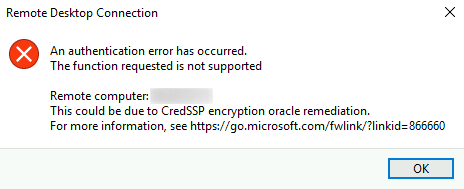
[Window Title]
Remote Desktop Connection

[Content]
An authentication error has occurred.
The function requested is not supported

Remote computer: 1.1.1.1
This could be due to CredSSP encryption oracle remediation.
For more information, see

[OK]
The Cause:
There’s this thing called Encryption Oracle Remediation (EOR) that would be installed on the client, server, or both. If the client has the CredSSP update installed, and Encryption Oracle Remediation is set to Mitigated. Then, this client will not allow insecure connections. On the same token, if the server has the CredSSP patched and is set to Force updated clients. That server will block any RDP connection from clients that do not have the CredSSP update installed. Here are the details of these compatibilities.
Interoperability Matrix:
| – | – | Server | – | – | – |
|---|---|---|---|---|---|
| – | – | Updated | Force updated clients | Mitigated | Vulnerable |
| Client | Updated | Allowed | Blocked 2 | Allowed | Allowed |
| Force updated clients | Blocked | Allowed | Allowed | Allowed | |
| Mitigated | Blocked 1 | Allowed | Allowed | Allowed | |
| Vulnerable | Allowed | Allowed | Allowed | Allowed |
Source: Microsoft
The Solutions:
- Option 1: patch both clients and servers
- Run these scripts
- Option 2: Set the Server EOR to Mitigated
- Not recommended
- Option 3: Set the Client to Vulnerable
- How To Execute ‘Option 3’
REG ADD HKLM\Software\Microsoft\Windows\CurrentVersion\Policies\System\CredSSP\Parameters\ /v AllowEncryptionOracle /t REG_DWORD /d 2
How to Revert ‘Option 3’
Set-ItemProperty -Path 'HKLM:\Software\Microsoft\Windows\CurrentVersion\Policies\System\CredSSP\Parameters' -name "AllowEncryptionOracle" 1 -Type DWord
Key value table:
- Force Updated Clients
Registry Hive HKEY_LOCAL_MACHINE Registry Path Software\Microsoft\Windows\CurrentVersion\Policies\System\CredSSP\Parameters Value Name AllowEncryptionOracle Value Type REG_DWORD Value 0 - Mitigated
Registry Hive HKEY_LOCAL_MACHINE Registry Path Software\Microsoft\Windows\CurrentVersion\Policies\System\CredSSP\Parameters Value Name AllowEncryptionOracle Value Type REG_DWORD Value 1 - Vulnerable
Registry Hive HKEY_LOCAL_MACHINE Registry Path Software\Microsoft\Windows\CurrentVersion\Policies\System\CredSSP\Parameters Value Name AllowEncryptionOracle Value Type REG_DWORD Value 2
Categories:
