Posted On October 12, 2020

Remote Desktop Error Code 0x8000FFFF

kimconnect 0 comments
blog.KimConnect.com >> Windows >> Remote Desktop Error Code 0x8000FFFF

Symptom:

Terminal-Services-ClientActiveXCore Event ID 226 on RDP Server:

rdpclient_ssl: an error was encountered when transitioning from TsSslStateDisconnected in response to TsSslEventInvalidState (error code 0x8000FFFF)

Error message from RDP client after 10+ seconds of displaying “Securing remote connection…”
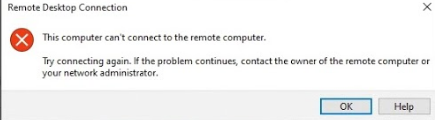
Resolution:

Uninstall RDP Client

Get-AppxPackage -Name Microsoft.RemoteDesktop | Remove-AppxPackage -Verbose

Reinstall RDP Client

Get-AppxPackage -Name Microsoft.RemoteDesktop | Foreach {Add-AppxPackage -DisableDevelopmentMode -Register "$($_.InstallLocation)\AppXManifest.xml" -Verbose}

Leave a Reply

Your email address will not be published. Required fields are marked *

Related Post

Microsoft Dynamics 365 Error with Send-As

Symptoms: Recurring error in Event Log #61346 - An error occurred while checking for outgoing…

Enable Remote Desktop Remotely

Quick tip on how to enable Remote Desktop remotely (by editing the remote registry)1. On…

How To Install Graylog in a Kubernetes Cluster Using Helm Charts

The following narrative is based on the assumption that a Kubernetes (current stable version 20.10)…
