Description
The remote Windows host is missing a security update. It is, therefore, missing microcode updates to address the following vulnerabilities:
– Spectre Variant 3a (CVE-2018-3640: Rogue System Register Read (RSRE)).
– Spectre Variant 4 (CVE-2018-3639: Speculative Store Bypass (SSB))
– L1TF (CVE-2018-3620, CVE-2018-3646: L1 Terminal Fault)
Solution
Microsoft has released security updates for Windows 10, Windows Server 2016 and Server 2019.
I’ve written 2 functions to check and remediate this vulnerability:
function checkSpectreVulnerability{

$patchedVersion="10.0.14393.2842"

$actualVersion=(Get-Item C:\Windows\system32\mcupdate_genuineintel.dll | select VersionInfo).VersionInfo.ProductVersion

if([version]$actualVersion -lt [version]$patchedVersion){

write-host"Detected version $actualVersion is less than the patched version $patchedVersion"

}else{

write-host"No Spectre meltdown vulnerability detected."

}

}
function fixSpectreVulnerability{
# KB4346087: https://www.catalog.update.microsoft.com/Search.aspx?q=KB4346087%20
$spectreDownload="http://download.windowsupdate.com/c/msdownload/update/software/updt/2019/02/windows10.0-kb4346087-v3-x64_d108fe2af745ebf98bfb0548c905c07715492941.msu"
$spectreDestination="C:\Temp\kb4346087-v3-x64.msu"
download $spectreDownload $spectreDestination
wusa.exe -kb $spectreDestination /norestart /quiet
<#
# DISM method
mkdir c:\temp\KB4346087
Expand –F:* $spectreDestination c:\temp\KB4346087
DISM.exe /Online /Add-Package /PackagePath:c:\temp\KB4346087\Windows10.0-KB4346087-v3-x64.cab /NoRestart
#>
}Output
PS C:\Users\test\Desktop\unit-test.ps1
10.0.14393.2842 vs 10.0.14393.2842
No Spectre meltdown vulnerability detected.
KB4346087 includes mcupdate_genuineintel.dll version 10.0.14393.2842. Manual installation would cause this popup to occur if the script above has already been triggered: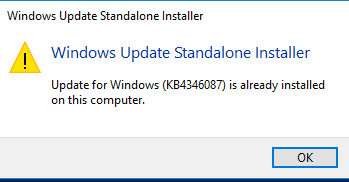
Here’s the result of a query of applied KB4346087 on this test system:
Example of system without KB4346087 installed (empty result)
PS C:\Users\test> dism /online /get-packages | findstr -i "KB4346087"
PS C:\Users\test>

PS C:\Users\test> Get-HotFix -Id "KB4346087"
Get-HotFix : Cannot find the requested hotfix on the 'localhost' computer. Verify the input and run the command again.
At line:1 char:1
+ Get-HotFix -Id "KB4346087"
+ ~~~~~~~~~~~~~~~~~~~~~~~~~~
    + CategoryInfo          : ObjectNotFound: (:) [Get-HotFix], ArgumentException
    + FullyQualifiedErrorId : GetHotFixNoEntriesFound,Microsoft.PowerShell.Commands.GetHotFixCommand
Example of pending install (no install date):
PS C:\Users\test> dism /online /get-packages | findstr -i "KB4346087"
Package Identity : Package_for_KB4346087~31bf3856ad364e35~amd64~~10.0.3.0

PS C:\Users\test> Get-HotFix -Id "KB4346087"

Source Description HotFixID InstalledBy InstalledOn
------ ----------- -------- ----------- -----------
KOMPUTER Update KB4346087
Confirmation of pending stalls:
PS C:\Users\test> Dism.exe /Online /Get-Packages

Deployment Image Servicing and Management tool
Version: 10.0.14393.0

Image Version: 10.0.14393.2457

Packages listing:

Package Identity : Microsoft-Windows-Foundation-Package~31bf3856ad364e35~amd64~~10.0.14393.0
State : Installed
Release Type : Foundation
Install Time : 7/16/2016 1:25 PM

Package Identity : Microsoft-Windows-LanguageFeatures-Basic-en-gb-Package~31bf3856ad364e35~amd64~~10.0.14393.0
State : Installed
Release Type : OnDemand Pack
Install Time : 2/2/2018 6:40 PM

Package Identity : Microsoft-Windows-LanguageFeatures-Basic-en-us-Package~31bf3856ad364e35~amd64~~10.0.14393.0
State : Installed
Release Type : OnDemand Pack
Install Time : 2/2/2018 6:41 PM

Package Identity : Microsoft-Windows-LanguageFeatures-Handwriting-en-us-Package~31bf3856ad364e35~amd64~~10.0.14393.0
State : Installed
Release Type : OnDemand Pack
Install Time : 2/2/2018 6:46 PM

Package Identity : Microsoft-Windows-LanguageFeatures-OCR-en-us-Package~31bf3856ad364e35~amd64~~10.0.14393.0
State : Installed
Release Type : OnDemand Pack
Install Time : 2/2/2018 6:47 PM

Package Identity : Microsoft-Windows-LanguageFeatures-Speech-en-us-Package~31bf3856ad364e35~amd64~~10.0.14393.0
State : Installed
Release Type : OnDemand Pack
Install Time : 2/2/2018 6:47 PM

Package Identity : Microsoft-Windows-LanguageFeatures-TextToSpeech-en-us-Package~31bf3856ad364e35~amd64~~10.0.14393.0
State : Installed
Release Type : OnDemand Pack
Install Time : 2/2/2018 6:47 PM

Package Identity : Microsoft-Windows-NetFx3-OnDemand-Package~31bf3856ad364e35~amd64~~10.0.14393.0
State : Installed
Release Type : OnDemand Pack
Install Time : 2/4/2019 10:35 PM

Package Identity : Microsoft-Windows-Security-SPP-Component-SKU-ServerStandard-GVLK-Package~31bf3856ad364e35~amd64~~10.0
.14393.0
State : Installed
Release Type : Feature Pack
Install Time : 2/2/2018 7:27 PM

Package Identity : Microsoft-Windows-Server-LanguagePack-Package~31bf3856ad364e35~amd64~en-US~10.0.14393.0
State : Installed
Release Type : Language Pack
Install Time : 2/2/2018 6:13 PM

Package Identity : Microsoft-Windows-ServerCore-Package~31bf3856ad364e35~amd64~~10.0.14393.0
State : Installed
Release Type : Feature Pack
Install Time : 7/16/2016 1:25 PM

Package Identity : Microsoft-Windows-ServerCore-Server-Common-Package~31bf3856ad364e35~amd64~~10.0.14393.0
State : Installed
Release Type : Feature Pack
Install Time : 7/16/2016 1:25 PM

Package Identity : Microsoft-Windows-ServerCore-SKU-Foundation-Package~31bf3856ad364e35~amd64~~10.0.14393.0
State : Installed
Release Type : Feature Pack
Install Time : 7/16/2016 1:25 PM

Package Identity : Package_for_KB4049065~31bf3856ad364e35~amd64~~10.0.1.3
State : Installed
Release Type : Update
Install Time : 2/2/2018 7:21 PM

Package Identity : Package_for_KB4054590~31bf3856ad364e35~amd64~~10.0.1.2072
State : Installed
Release Type : Update
Install Time : 2/23/2019 4:11 AM

Package Identity : Package_for_KB4091664~31bf3856ad364e35~amd64~~10.0.6.0
State : Installed
Release Type : Update
Install Time : 2/5/2019 6:39 PM

Package Identity : Package_for_KB4132216~31bf3856ad364e35~amd64~~10.0.1.0
State : Installed
Release Type : Update
Install Time : 2/4/2019 11:46 PM

Package Identity : Package_for_KB4346087~31bf3856ad364e35~amd64~~10.0.3.0
State : Install Pending
Release Type : Update
Install Time :

Package Identity : Package_for_KB4465659~31bf3856ad364e35~amd64~~10.0.1.2
State : Installed
Release Type : Security Update
Install Time : 2/5/2019 1:26 AM

Package Identity : Package_for_KB4485447~31bf3856ad364e35~amd64~~10.0.1.1
State : Installed
Release Type : Security Update
Install Time : 2/23/2019 4:11 AM

Package Identity : Package_for_RollupFix~31bf3856ad364e35~amd64~~14393.1884.1.3
State : Superseded
Release Type : Security Update
Install Time : 2/2/2018 7:21 PM

Package Identity : Package_for_RollupFix~31bf3856ad364e35~amd64~~14393.2941.1.10
State : Installed
Release Type : Update
Install Time : 5/1/2019 7:05 PM

The operation completed successfully.
Once the patch has already been applied. Rebooting the computer will be the last step to enable Windows system to render patching as completed.
Categories: