Linux is a great platform for development. One advantage of a this OS is that it will most likely run without the heavy weight antivirus utilities that Windows often require. The extra CPU & memory resources saved can be utilized elsewhere – what better use of a nerd’s time than to code? Thanks to Microsoft, we have Visual Studio Code (VS Code) being made available for Linux platforms. Unfortunately, the Visual Studio Integrated Development Environment (IDE) is only available on Windows/MacOS at the moment. Fortunately, Code starts up faster than it’s full-pledged counterpart. Most programming languages are supported also. Here are a few lines to get that going.
VS Code
# Install VS Code
sudo apt -y install software-properties-common apt-transport-https wget
wget -q https://packages.microsoft.com/keys/microsoft.asc -O- | sudo apt-key add -
sudo add-apt-repository "deb [arch=amd64] https://packages.microsoft.com/repos/vscode/ stable main"
sudo apt -y install code
Setting VS Code for PowerShell Development:
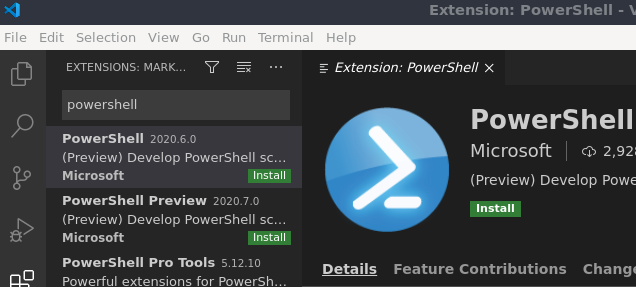
Add PowerShell Extension: click on the Extentions icon (the four squares) > search for ‘powershell’ > select and install
Edit Settings: File > Preferences > Settings > Extensions > Scroll down and find “Edit in settings.json”
DotNet Core
# Install DotNet Core 3.1 SDK (which also includes runtime)
# Source: https://learn.microsoft.com/en-us/dotnet/core/install/linux-ubuntu
osversion=$(lsb_release -sr)
wget  -O packages-microsoft-prod.deb
sudo dpkg -i packages-microsoft-prod.deb
sudo apt-get update; \
  sudo apt-get install -y apt-transport-https && \
  sudo apt-get update && \
  sudo apt-get install -y dotnet-sdk-3.1
PowerShell Core
# Install Powershell
sudo snap install powershell --classic
# Start PowerShell
kim@kimlinux:~$ pwsh
PowerShell 7.0.3
Copyright (c) Microsoft Corporation. All rights reserved.
https://learn.microsoft.com/en-us/powershell/
Type 'help' to get help.
PS /home/kim>