Symptom:
$vmName='bad-guestvm'
$vm = Get-SCVirtualMachine -Name $vmName
Read-SCVirtualMachine -VM $vm

Read-SCVirtualMachine : The selected action could not be completed because the virtual machine is not in a state in
which the action is valid. (Error ID: 1730)

Check the state of the virtual machine, and verify that the selected job can be run on a virtual machine in that state.

To restart the job, run the following command:
PS> Restart-Job -Job (Get-VMMServer localhost | Get-Job | where { $_.ID -eq "{442cfeda-2df8-4ee8-9c3d-f36390653124}"})
At line:1 char:1
+ Read-SCVirtualMachine -VM $vm
+ ~~~~~~~~~~~~~~~~~~~~~~~~~~~~~
    + CategoryInfo          : ReadError: (:) [Read-SCVirtualMachine], CarmineException
    + FullyQualifiedErrorId : 1730,Microsoft.SystemCenter.VirtualMachineManager.Cmdlets.RefreshVmCmdlet

Resolution: remove guest VM clustered role an then re-add it to the cluster
Resolution:
remove guest VM clustered role an then re-add it to the cluster
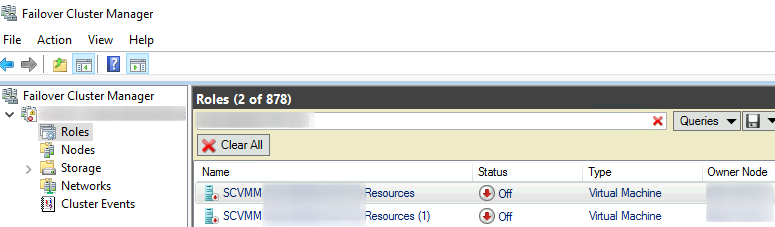
1. Remove Clustered Role
# Experimental: remove clustered roles via PowerShell
# Note: currently, these commands don't remove the roles properly; hence, the GUI method is necessary
$vmName='bad-guestvm0001'
$clusteredRoles=Get-ClusterResource -name *$vmName*
foreach($role in $clusteredRoles){
    $ownerNode=$role.OwnerNode
    $roleName=$role.Name
    write-warning "Remove-ClusterResource -Name $roleName -Force"
    pause
    if($env:computername -ne $role.OwnerNode){
        $session=new-pssession $ownerNode
        if($session.State -eq 'Opened'){
            invoke-command -session $session {param($roleName)Remove-ClusterResource -Name $roleName -Force} -Args $roleName
            remove-pssession $session
        }
    }else{
        Remove-ClusterResource -Name $roleName -Force
    }
}
2. Re-add Guest VM to clustered role
# Required: console or RDP session onto the owner node

# Experimental: running this command via Remote WinRM has failed with this error
# WARNING: If you are running Windows PowerShell remotely, note that some failover clustering cmdlets do not work
# remotely. When possible, run the cmdlet locally and specify a remote computer as the target. To run the cmdlet
# remotely, try using the Credential Security Service Provider (CredSSP). All additional errors or warnings from this
# cmdlet might be caused by running it remotely.
# WARNING: You do not have administrative privileges on the cluster. Contact your network administrator to request
# access.
#     Access is denied
$vmName='bad-guestvm'
function addVmToCluster{
    param($vmNames,$targetCluster)
    $results=@()
    foreach ($vmName in $vmNames){
        try{
            #Start-VM -Name $vmName -EA Stop
            if(!$targetCluster){$targetCluster=(get-cluster -ea SilentlyContinue).Name}
            if($targetCluster){
                Add-ClusterVirtualMachineRole -Cluster $targetCluster -VirtualMachine $vmName -EA Stop
                $results+=[hashtable]@{$vmName=$true}
            }else{
                write-host "No clusters defined."
                $results+=[hashtable]@{$vmName=$false}
                }
        }catch{
            write-warning "$($error[0])"
            $results+=[hashtable]@{$vmName=$false}
            }
    }
    return $results
}

addVmToCluster $vmName
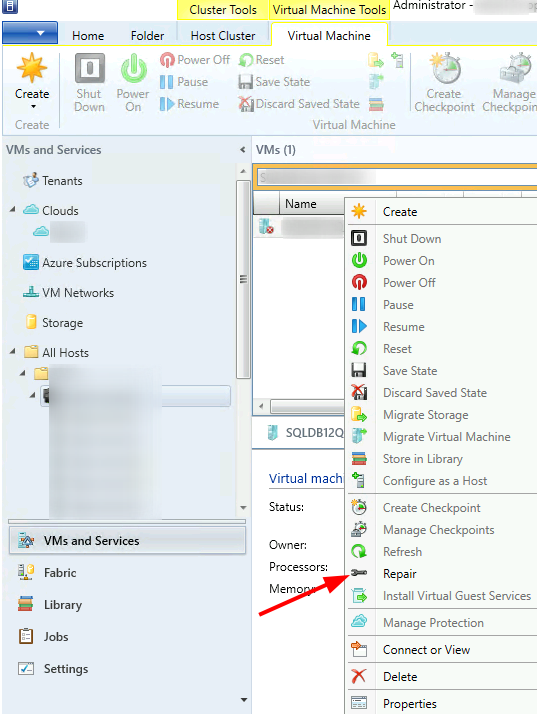
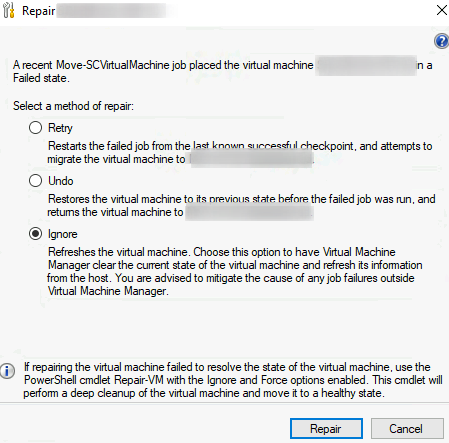
Repair with the Ignore Option:
Categories:

Thomas N.
Thank you for the post. Resolved my issue with provisioning new machines from Citrix Cloud.
kimconnect
You’re welcome, Thomas! I’m glad that this has been useful 🙂