Posted On July 2, 2019

Windows: Quickly Identify Cert Servers

kimconnect 0 comments
blog.KimConnect.com >> Windows >> Windows: Quickly Identify Cert Servers

Command:

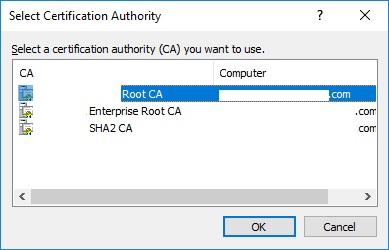
certutil -config - -ping

Output:

Leave a Reply

Your email address will not be published. Required fields are marked *

Related Post

HostFront Troubleshooting

If the user gets a message similar to this:            Then…

PowerShell: How to Disable Users Authenticated Control (UAC)

This has been tested on Windows Server 2008, 2016, and 2019. Nothing fancy, just copy/paste…

PowerShell: Enable TLS 1.2 on Windows

function enableTls12{ try{ $null=New-Item 'HKLM:\SYSTEM\CurrentControlSet\Control\SecurityProviders\SCHANNEL\Protocols\TLS 1.2\Server' -Force $null=New-Item 'HKLM:\SYSTEM\CurrentControlSet\Control\SecurityProviders\SCHANNEL\Protocols\TLS 1.2\Client' -Force $null=New-ItemProperty -Path 'HKLM:\SYSTEM\CurrentControlSet\Control\SecurityProviders\SCHANNEL\Protocols\TLS 1.2\Server'…