Posted On October 16, 2021

How To Fix History Disabled in Task Scheduler

kimconnect 0 comments
blog.KimConnect.com >> Windows >> How To Fix History Disabled in Task Scheduler

Issue:

When checking certain tasks, one may find that the ‘History’ tab is appended with the word ‘disabled’

Resolution:

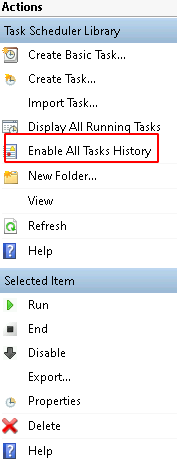
Select the affected task > locate the ‘Enable All Tasks History’ on the Actions menu toward the right side of the screen
Leave a Reply

Your email address will not be published. Required fields are marked *

Related Post

Enable Remote Desktop Remotely

Quick tip on how to enable Remote Desktop remotely (by editing the remote registry)1. On…

Should I Choose the Motherboard (Fake) Hardware Raid Or Software RAID?

Motherboard Hardware Raid: - Advantages: - OS Independence - Easier to setup and use- Disadvantages:…

PowerShell: Remediate Microsoft Windows Unquoted Service Path Enumeration

Description The remote Windows host has at least one service installed that uses an unquoted…
