Posted On October 16, 2021

How To Fix History Disabled in Task Scheduler

kimconnect 0 comments
blog.KimConnect.com >> Windows >> How To Fix History Disabled in Task Scheduler

Issue:

When checking certain tasks, one may find that the ‘History’ tab is appended with the word ‘disabled’

Resolution:

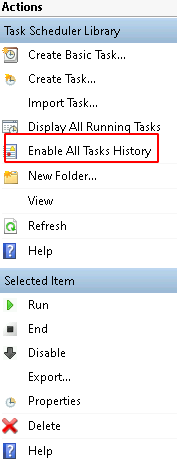
Select the affected task > locate the ‘Enable All Tasks History’ on the Actions menu toward the right side of the screen
Leave a Reply

Your email address will not be published. Required fields are marked *

Related Post

How to Setup Dynamic DNS with Google Domains & Ubiquity EdgeRouter

Step 1: Set up Dynamic DNS - Access Google Domains: - Click on the Manage…

Script to Purge Stuck Print Jobs

Create a Task Scheduler:- Program to run: powershell.exe- Argument: -ExecutionPolicy Bypass c:\scripts\clearStuckQueue.ps1- Trigger: daily, repeat…

Quick 1-liner: Raise Domain Functional Level from 2003 to 2012 R2

This command is required to enable 2012R2 functional level (group policy replication) adprep /domainprep /gpprep…
