Posted On April 5, 2019

Exchange 2010: How to Increase Mailbox Quota for Individual Users

kimconnect 0 comments
blog.KimConnect.com >> Windows >> Exchange 2010: How to Increase Mailbox Quota for Individual Users

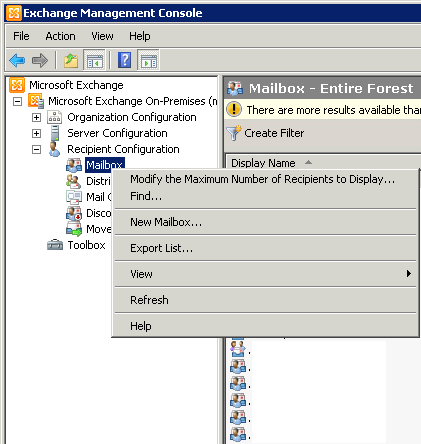
Exchange Management Console > Recipient Configuration > Right-click on Mailbox > Find
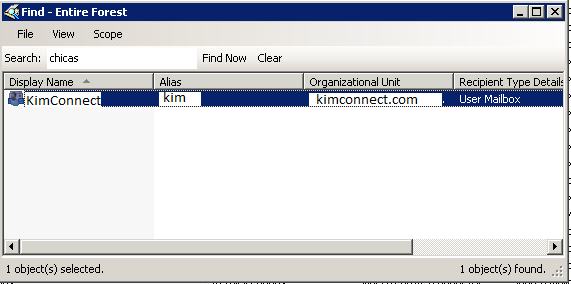
Input the username in the Search Field > click Find Now
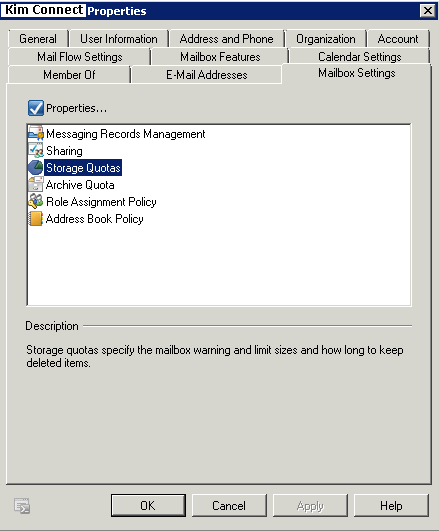
Click on Mailbox Settings tab > select Storage Quotas
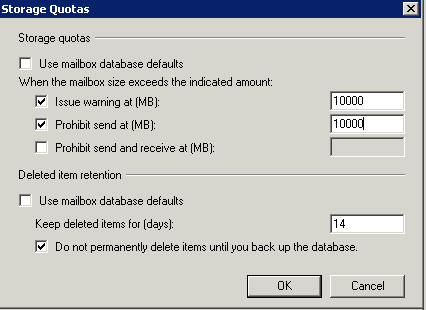
Click on Properties > Storage Quotas window appears > change the values corresponding to Issue warning at (MB) > OK
Leave a Reply

Your email address will not be published. Required fields are marked *

Related Post

How to set up Sip Trunk between two offices

1. Set up two Asterisk machines: Asterisk1 & Asterisk2   Example for Ubuntu: vim /etc/network/interfaces configure…

Use Group Policy to remotely install software in a Microsoft Active Directory Windows Environment

Update: this instruction has been succeeded by this.   Step 1: Create a Organizational Unit…

How to Cramp For a Test

From my experience, the trick to memorizing 10,000+ questions and answers at the 90% accuracy…