Posted On October 20, 2020

IIS Error Code 0x80070021

kimconnect 0 comments
blog.KimConnect.com >> Codes >> IIS Error Code 0x80070021
Error Message:
Detailed Error Information:
Module IIS Web Core
Notification BeginRequest
Handler Not yet determined
Error Code 0x80070021
Config Error This configuration section cannot be used at this path. This happens when the section is locked at a parent level. Locking is either by default (overrideModeDefault="Deny"), or set explicitly by a location tag with overrideMode="Deny" or the legacy allowOverride="false".
Config File \\?\C:\HooliApp\web.config
Resolution:

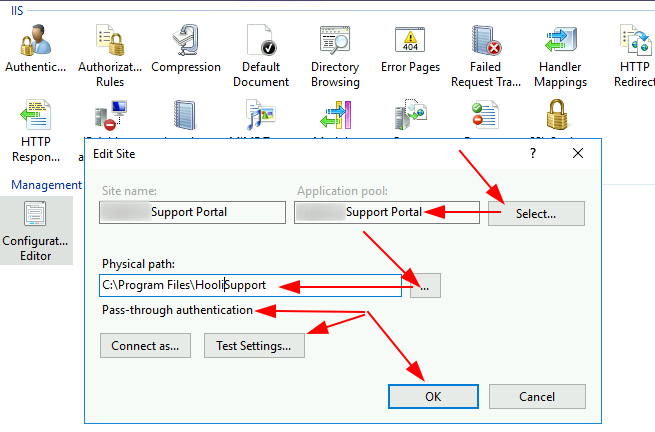
Run InetMgr.exe > Sites > select Hooli Support Portal > right-click Configuration Editor > Set Application Pool, Physical Path, and authentication as Pass-through > Test settings > OK
Leave a Reply

Your email address will not be published. Required fields are marked *

Related Post

PowerShell: connectWinRM Function to Create New-PSSession

This reusable function may be included into PoSh scripts for better connection toward Windows machines…

PowerShell: Add Root Domain to Trusted Sites

Windows Servers often have 'hard admin' modes, where accesses to external websites are painstakingly restricted.…

PowerShell: Add Windows NTFS Permissions to File or Folder

The re-usable function: $path='C:\Windows\servicing' $accountsToAdd='Administrators' $permissions='Full' function addNtfsPermissions ($path,$accountsToAdd,$permissions){ $acl = Get-ACL $path $accessRule=New-Object System.Security.AccessControl.FileSystemAccessRule($accountsToAdd,$permissions,"Allow")…
