Posted On October 20, 2020

IIS Error Code 0x80070021

kimconnect 0 comments
blog.KimConnect.com >> Codes >> IIS Error Code 0x80070021
Error Message:
Detailed Error Information:
Module IIS Web Core
Notification BeginRequest
Handler Not yet determined
Error Code 0x80070021
Config Error This configuration section cannot be used at this path. This happens when the section is locked at a parent level. Locking is either by default (overrideModeDefault="Deny"), or set explicitly by a location tag with overrideMode="Deny" or the legacy allowOverride="false".
Config File \\?\C:\HooliApp\web.config
Resolution:

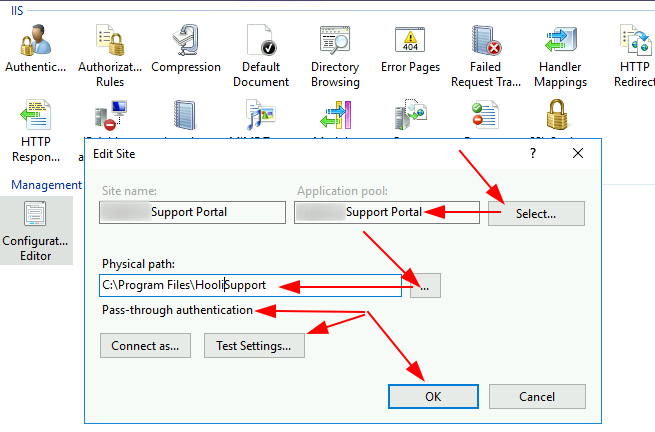
Run InetMgr.exe > Sites > select Hooli Support Portal > right-click Configuration Editor > Set Application Pool, Physical Path, and authentication as Pass-through > Test settings > OK
Leave a Reply

Your email address will not be published. Required fields are marked *

Related Post

Credit_Invoice_Reprints_ZZ6_7_8.bat

fsguiapp.exe -cm:\mfgsys\fs.cfg -iZZ1{TAB}y2k99{CR}bexe{ESC}zz6{CR}M:\cabsauto\timeout 15fsguiapp.exe -cm:\mfgsys\fs.cfg -iZZ2{TAB}y2k99{CR}bexe{ESC}zz7{CR}M:\cabsauto\timeout 15fsguiapp.exe -cm:\mfgsys\fs.cfg -iZZ3{TAB}y2k99{CR}bexe{ESC}zz8{CR}rem M:\cabsauto\timeout 15rem fsguiapp.exe -s -cm:\mfgsys\fs.cfg -iZZ4{TAB}y2k99{CR}bexe{ESC}zz4{CR}

How To Prevent Windows From Automatically Rebooting After Updates

# Add New Registry Key $regHive='REGISTRY::HKLM\SOFTWARE\Policies\Microsoft\Windows\WindowsUpdate\AU' $keyname='NoAutoRebootWithLoggedOnUsers' $value=1 Set-ItemProperty -Path $regHive -Name $keyname -value $value…

Python Module: JSON

Overview JavaScript Object Notation (JSON) is written in plain-text that is very useful to store…
Other project: DragonCoin.com
