Posted On March 29, 2019

Connecting to Dell EqualLogic PS series SAN using Cisco console cable (72-3383-01)

kimconnect 0 comments
blog.KimConnect.com >> Windows >> Connecting to Dell EqualLogic PS series SAN using Cisco console cable (72-3383-01)
If a console cable isn’t available, one may create one using an existing Cisco cable (72-3383-01) by snipping and discarding the RJ45 end > re-crimp a new RJ45 using the following pin out / wire color diagram:
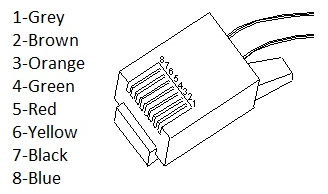
 

Once the cable has been created, connect the DB9 end to a computer.  Connect the RJ45 end into the SERIALPORT on the back of the SAN that looks like this:

 

Now open Putty on the computer the DB9 end is connected to and configure Putty with the following settings:
            Set the Connection Type: to Serial
            On the left under Category > Connection > Serial, configure the following settings:
                         Speed:  9600
                        Data bit:  8
                        Stop bits:  1
                        Parity:  None
                        Flow control:  XON/XOFF
When the console comes up hit the Enter key and you should then be prompted to login.

Leave a Reply

Your email address will not be published. Required fields are marked *

Related Post

Shoretel: Why do we need an inventory of MAC addresses?

Answer: systems such are Shoretel's licensing are dependent on the MAC address of the original…

How to Use XrmToolBox for Microsoft Dynamics 365

The following is an illustration of the usage of this nice and free utility to…

Use DISM To Install Windows Features

Deployment Image Servicing and Management (DISM.exe) is a command-line tool that can be used to…
